This page lists every Speedtest by Ookla run from my Saily vs. Simbye eSIM test, including the runs I excluded and why. I tested both eSIMs on the same phone at two U.S. locations, my home and a remote spot nearby, with my regular Mint Mobile line as a baseline. The posts that cover this test summarize the numbers. This page shows each run behind them.
Speeds vary by location, signal strength, network congestion, and time of day. These results reflect my area in the lower foothills, where coverage can be spotty, and they may be better or worse where you are. Simbye provided its eSIM free for testing, and Saily’s 1 GB U.S. plan came free through its affiliate team.
Results at a Glance
Line
Location
Date
Runs
Download (Mbps)
Upload (Mbps)
Idle ping
Mint (baseline)
Home
Oct 3
1
19.4
2.32
30 ms
Saily
Home
Oct 29
7
5.81 (median)
5.92 (median)
108 ms (median)
Simbye
Home
Oct 3
1
4.61
1.06
45 ms
Mint (baseline)
Remote
Oct 3
1
10.3
3.37
33 ms
Saily
Remote
Oct 29
4
2.86 (median)
3.06 (median)
443 ms (median)
Simbye
Remote
Oct 3
1
0.62
0.24
80 ms
Saily was faster than Simbye at both locations, and Simbye had lower ping at both. At the remote spot, Saily’s median download was about 4.6 times Simbye’s and its median upload about 12.7 times. At home, the download difference was smaller (about 1.3 times), with upload about 5.6 times higher. Saily’s idle ping ran about 2.4 times Simbye’s at home and about 5.5 times at the remote spot.
How I Tested
App: Speedtest by Ookla on Android
Phone: Samsung Galaxy A16 5G (SM-A166U1), the same phone for every run
Wi-Fi: Off for every counted run, so each result measured the eSIM’s mobile data
Networks: Saily connects through Webbing and was roaming in the U.S. (the “R” icon showed in the status bar). Simbye’s U.S. plan is a domestic line on AT&T’s network through the operator LinkUp. Mint runs on T-Mobile.
Dates: Mint and Simbye on October 3, 2026. Saily on October 29, 2026. Different days mean different network conditions.
Times: Home runs in the early afternoon (around 1 PM to 2 PM). Remote runs in the late afternoon (around 4 PM to 5 PM).
Test servers: The app picks a test server automatically, and I chose a few by hand. All servers were in Northern California. They varied by run, so server choice is one reason Saily’s results spread out.
Runs per line: One run per location for Mint and Simbye. Seven runs at home and four at the remote spot for Saily.
Medians: For Saily, I report the median instead of the average, so one unusually fast or slow run doesn’t skew the result.
For context, my home Wi-Fi averaged 33.7 Mbps download and 12.3 Mbps upload across three runs on October 3. None of the Wi-Fi runs count toward the eSIM results.
Home Location Results
Saily (October 29, 2026)
Time
Network
Download (Mbps)
Upload (Mbps)
Idle ping
Jitter
1:06 PM
LTE
1:13
1.53
Not recorded
Not recorded
1:11 PM
LTE
8:10
2.90
Not recorded
Not recorded
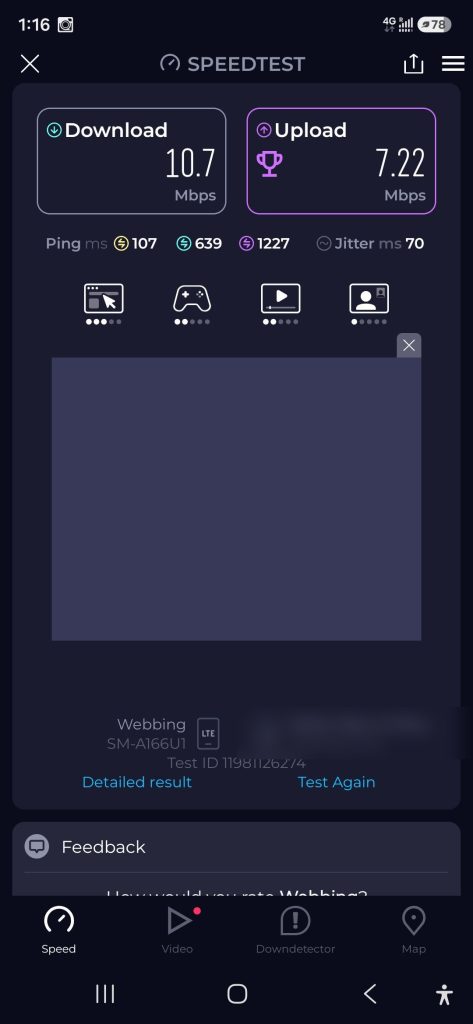
1:15 PM
LTE
10.7
7.22
107 ms
70 ms
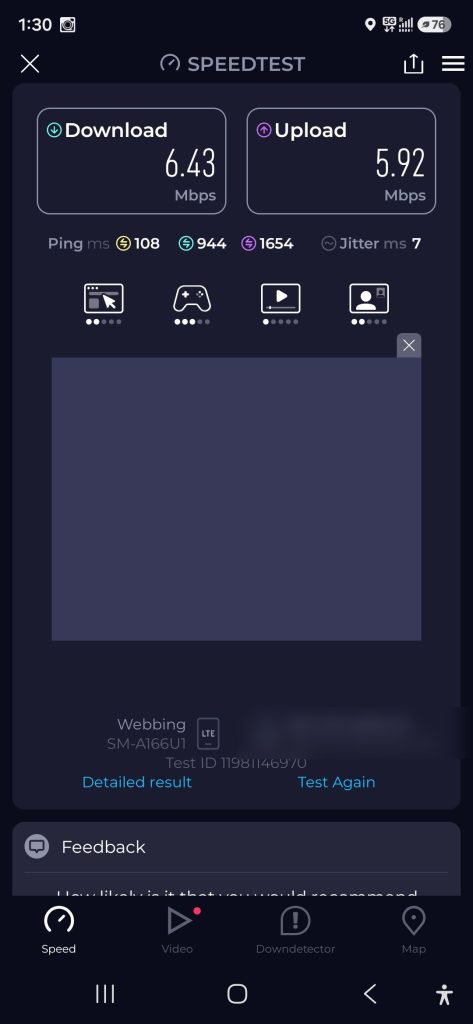
1:29 PM
LTE
6:43
5.92
108 ms
7 ms
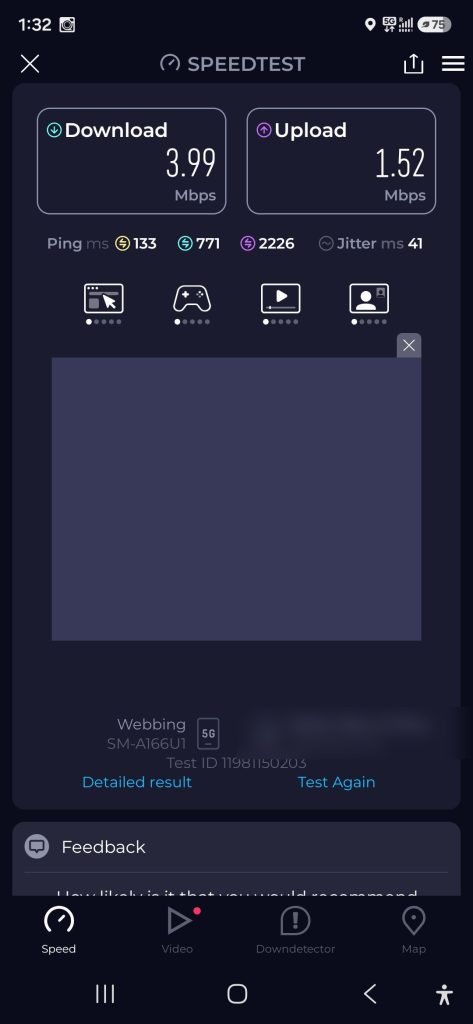
1:32 PM
5G
3.99
1.52
133 ms
41 ms
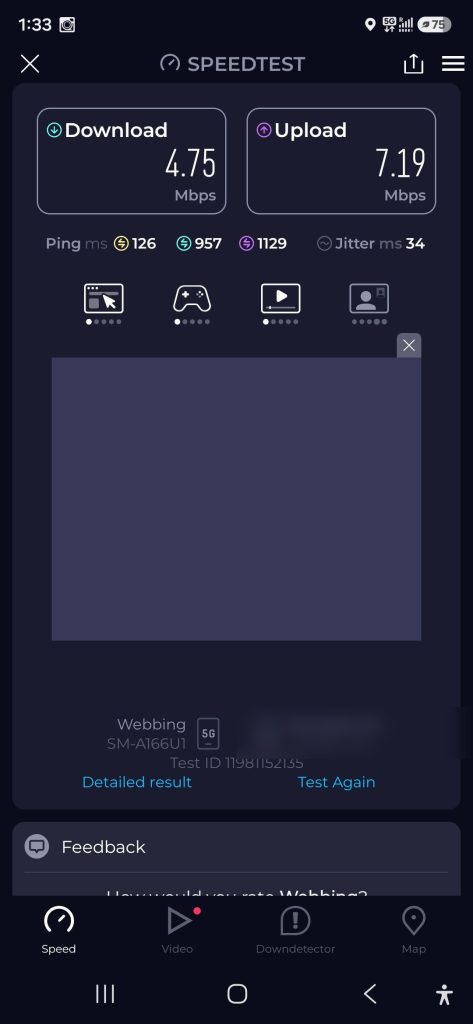
1:33 PM
5g
4.75
7.19
126 ms
34 ms
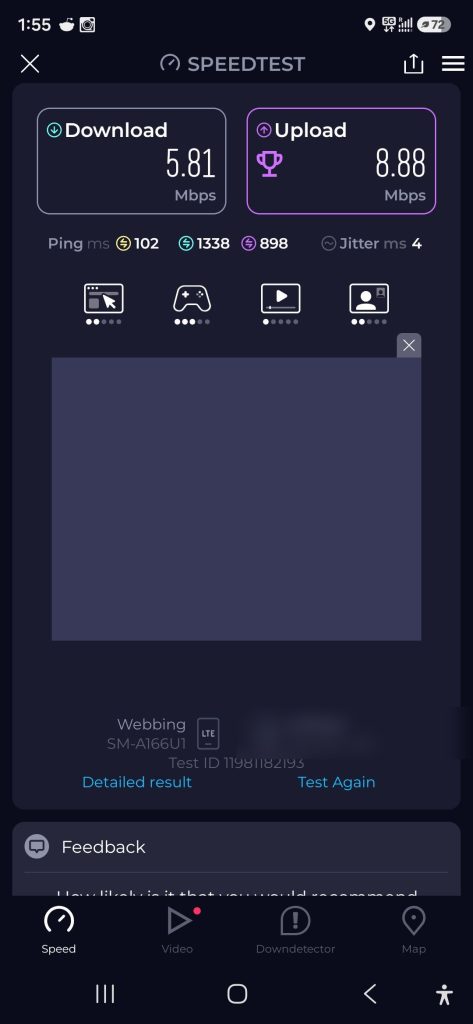
1:54 PM
LTE
5.87
8.88
102 ms
4 ms
Median (7 runs)
5.81
5.92
108 ms (5 runs)
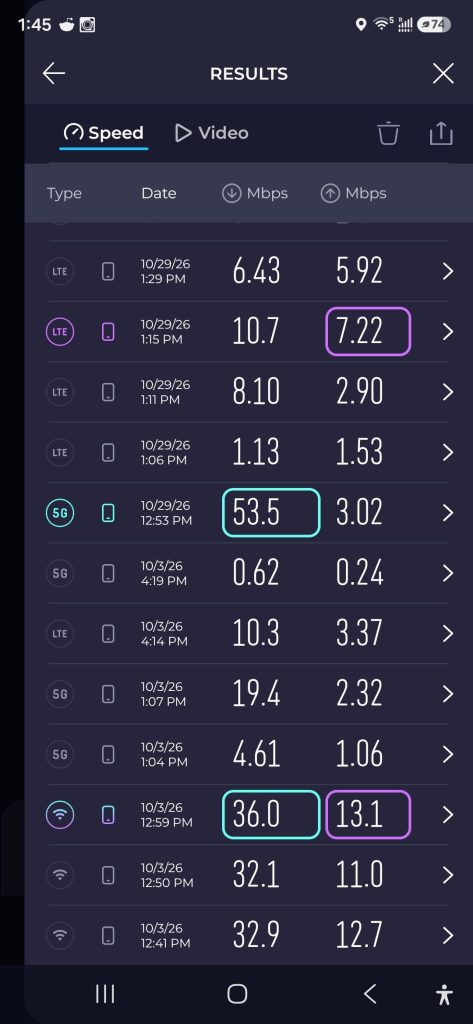
The 1:06 and 1:11 PM runs appear only in the app’s history list, which shows speed but not ping.
Simbye (October 3, 2026)
Time
Network
Download (Mbps)
Upload (Mbps)
Idle ping
Jitter
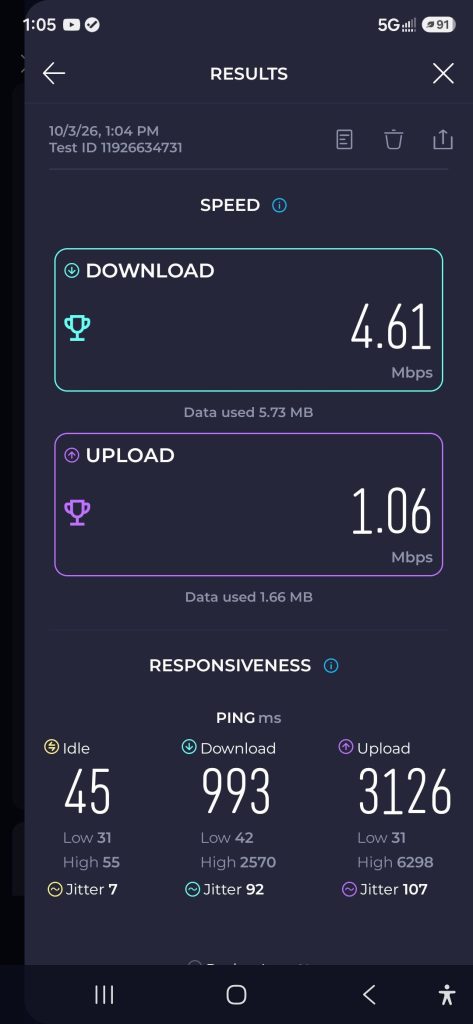
1:04 PM
5G
4.61
1.06
45 ms
7 ms
Mint Mobile Baseline (October 3, 2026)
Time
Network
Download (Mbps)
Upload (Mbps)
Idle ping
Jitter
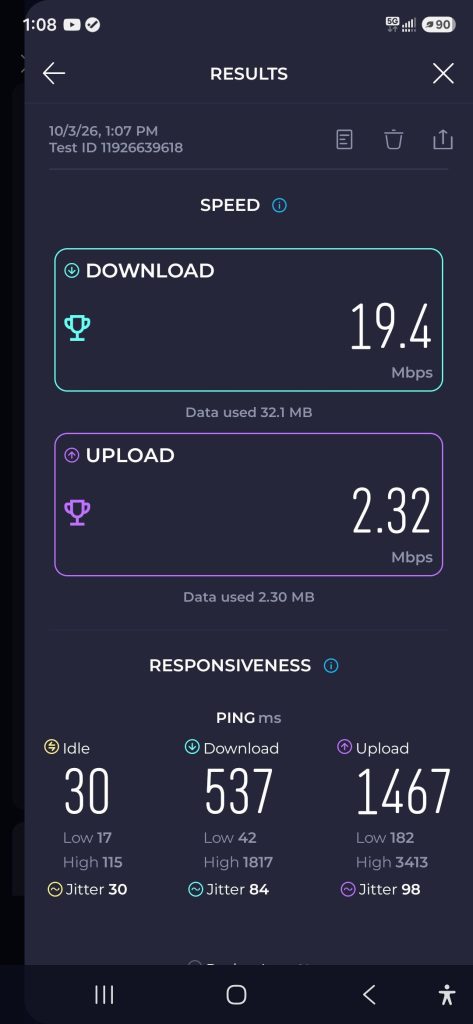
1:07 PM
5G
19.4
2.32
30 ms
30 ms
Remote Location Results
Saily (October 29, 2026)
Time
Network
Download (Mbps)
Upload (Mbps)
Idle ping
Jitter
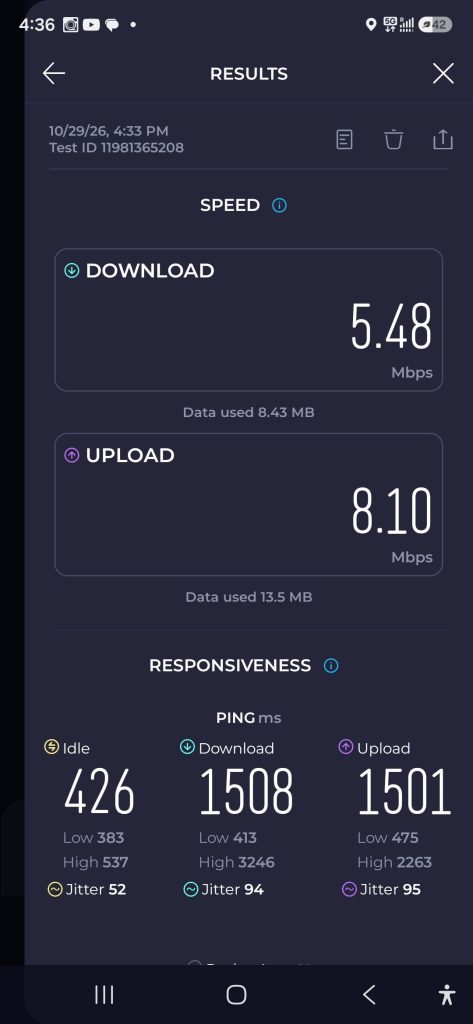
4:33 PM
5G
5.48
8.10
426 ms
52 ms
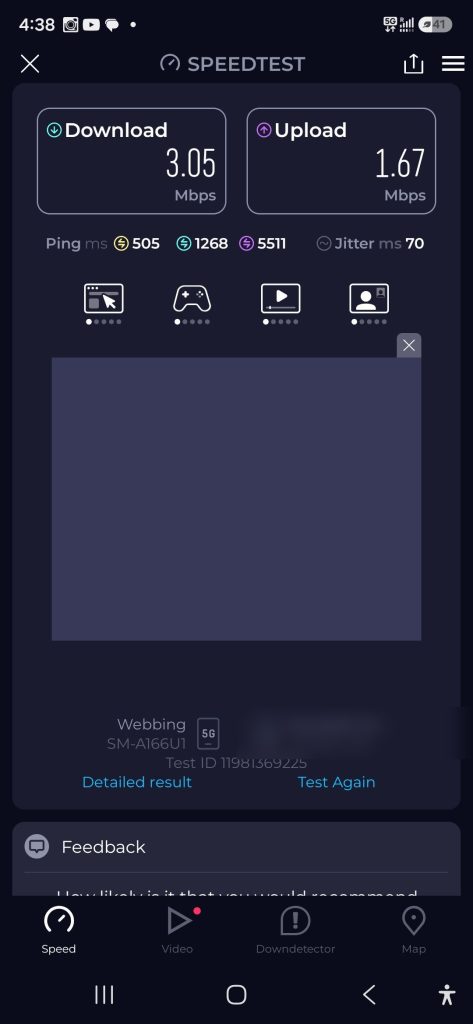
4:38 PM
5G
3.05
1.67
505 ms
70 ms
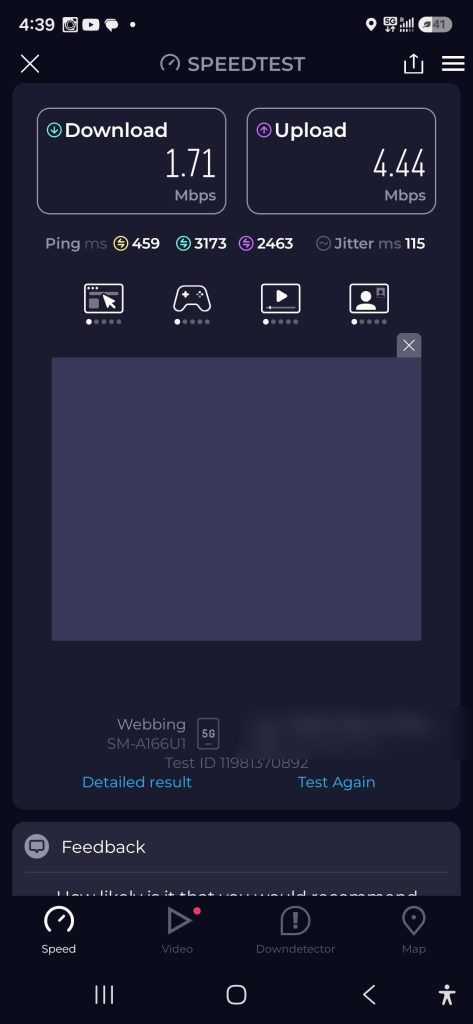
4:39 PM
5G
1.71
4.44
459 ms
115 ms
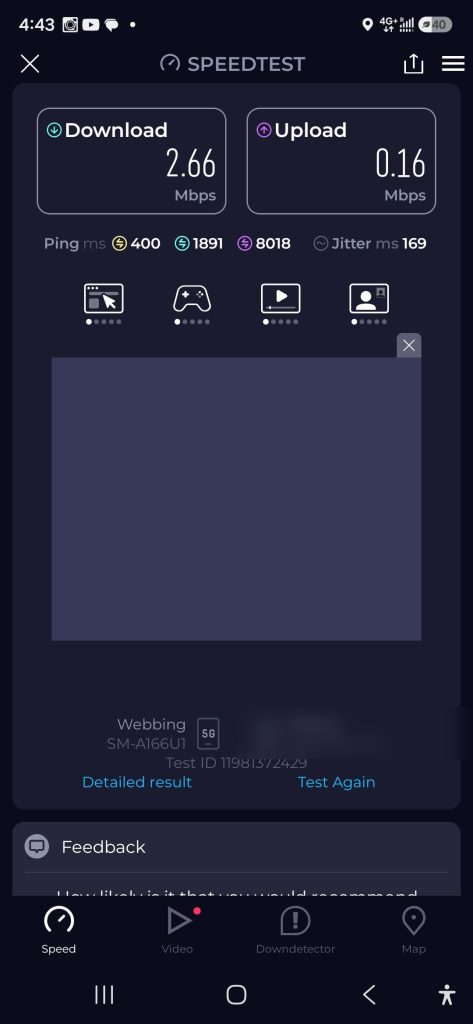
4:43 PM
5G
2.66
0.16
400 ms
169 ms
Median (4 runs)
2.86
3.06
443 ms
Simbye (October 3, 2026)
Time
Network
Download (Mbps)
Upload (Mbps)
Idle ping
Jitter
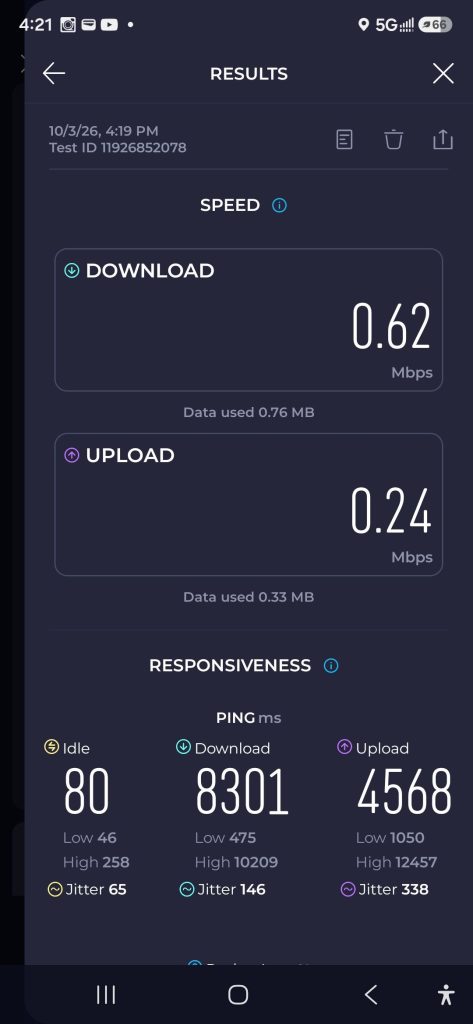
4:19 PM
5G
0.62
0.24
80 ms
65 ms
Mint Mobile Baseline (October 3, 2026)
Time
Network
Download (Mbps)
Upload (Mbps)
Idle ping
Jitter
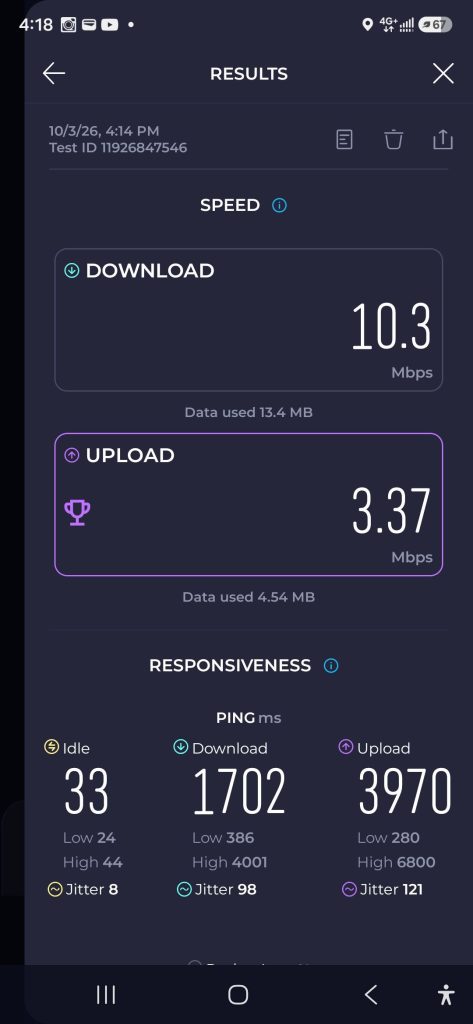
4:14 PM
LTE
10.3
3.37
33 ms
8 ms
Excluded Runs and Why
Four runs are left out of every number above, because each one measured something other than the eSIM’s mobile data.
Date
Time
Line
Download (Mbps)
Upload (Mbps)
Why it was excluded
Oct 29
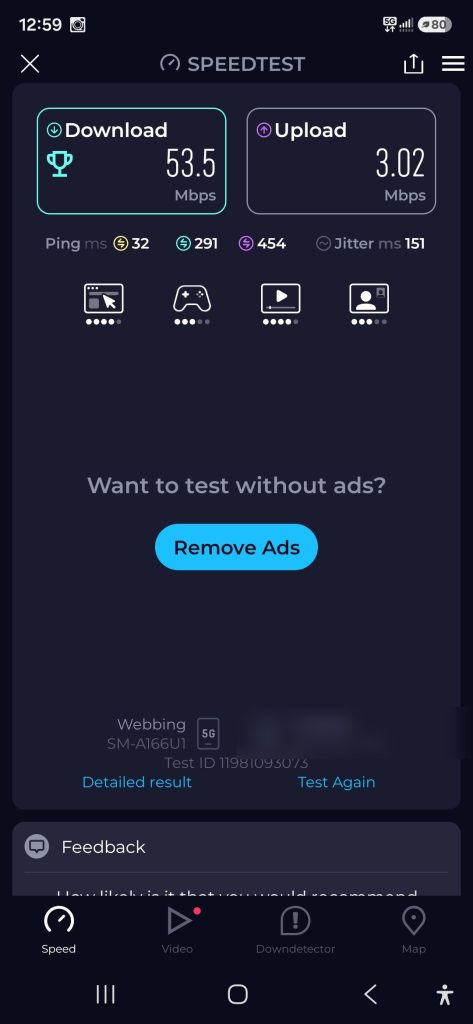
12:53 PM
Saily
53.5
3.02
Wi-Fi was still on
Oct 29
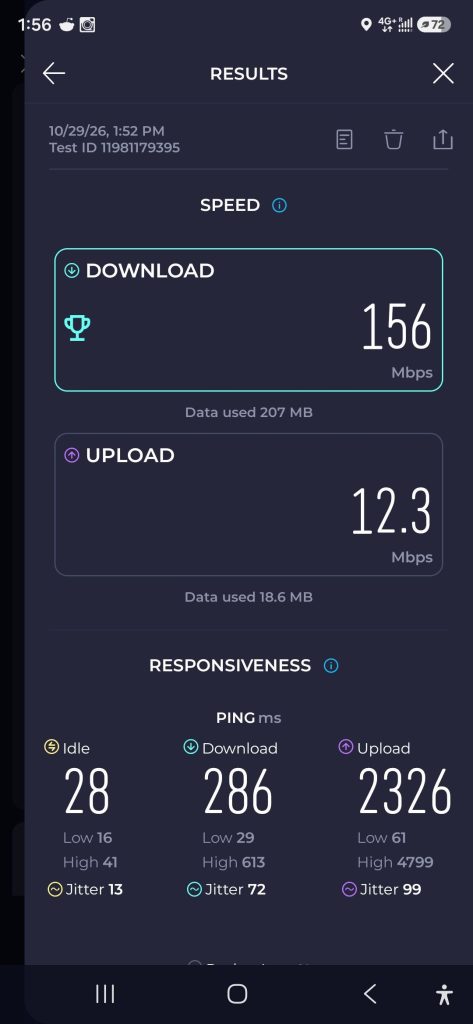
1:52 PM
Saily
156
12.3
Wi-Fi was on, so it measured my home internet
Oct 3
Afternoon
Mint (laptop hotspot)
28.06
2.54
Both hotspot results reported the same home internet connection, so they likely didn’t measure either line
Oct 3
Afternoon
Simbye (laptop hotspot)
5.10
5.59
Same as above
After the hotspot results, I dropped the hotspot comparison and kept only phone tests on mobile data.
What I’d Change Next Time
Run at least three tests per line at each spot
Use the same test servers across every line
Test all lines on the same day, back to back
Confirm Wi-Fi is off and check the provider name before saving each screenshot