
Some links in this post may be affiliate links. I may earn a commission at no extra cost to you.
A VPN, or virtual private network, is a service that encrypts your internet connection and routes it through a server run by the VPN provider, hiding your traffic and real IP address from your internet service provider, your network administrator, and anyone else on the same network. Once connected, your device gets a new IP address tied to the VPN server instead of your actual location, and everything you send and receive is scrambled into unreadable code until it reaches the VPN provider’s server.
That’s the whole concept. The rest of this guide covers how it actually works, what it protects you from (and what it doesn’t), and how to pick one that fits how you actually use the internet.
How Does a VPN Work?
The tunnel forms through a quick handshake between your device and the VPN server, where both sides agree on an encryption key before any of your data moves. From that point, everything leaving your device is wrapped in that encryption before it touches the local network, so a café router or airport hotspot only ever sees scrambled data addressed to the VPN server, never the sites behind it.
Your DNS requests, the lookups that translate a web address into an actual location, get routed through that same tunnel instead of your ISP’s servers, which is one of the more overlooked things people assume a VPN doesn’t cover.
The FTC explains it this way: a VPN app makes your traffic appear to originate from the VPN’s servers, and if it encrypts that data, anyone watching your connection sees gibberish, even on a site that doesn’t use its own encryption.
Why People Actually Use a VPN
The “public Wi-Fi will get you hacked” warning that’s been repeated since 2015 needs an update. HTTPS is now standard on the overwhelming majority of websites, and modern browsers enforce HSTS (HTTP Strict Transport Security), which blocks a lot of the interception tricks that made open Wi-Fi genuinely dangerous a decade ago. Someone sitting near you at a coffee shop generally can’t read your Gmail just by sharing a network anymore.
That doesn’t mean a VPN has lost its point. It’s just shifted:
- Hiding your browsing from your ISP, which can otherwise see and sell metadata about every site you visit
- Avoiding price discrimination and geo-restrictions tied to your location
- Getting around network-level blocks on restrictive corporate, school, or hotel Wi-Fi
- Adding a layer of protection against evil twin (rogue access point) attacks and unencrypted captive portal logins, which remain real risks even in 2026
- Keeping your IP address off the record for anyone doing casual lookups
None of this makes a VPN optional, it just means the reasons to use one have moved past the coffee shop horror story. The bigger question is what a VPN actually covers once it’s running, and just as importantly, what it doesn’t.
What a VPN Doesn’t Do
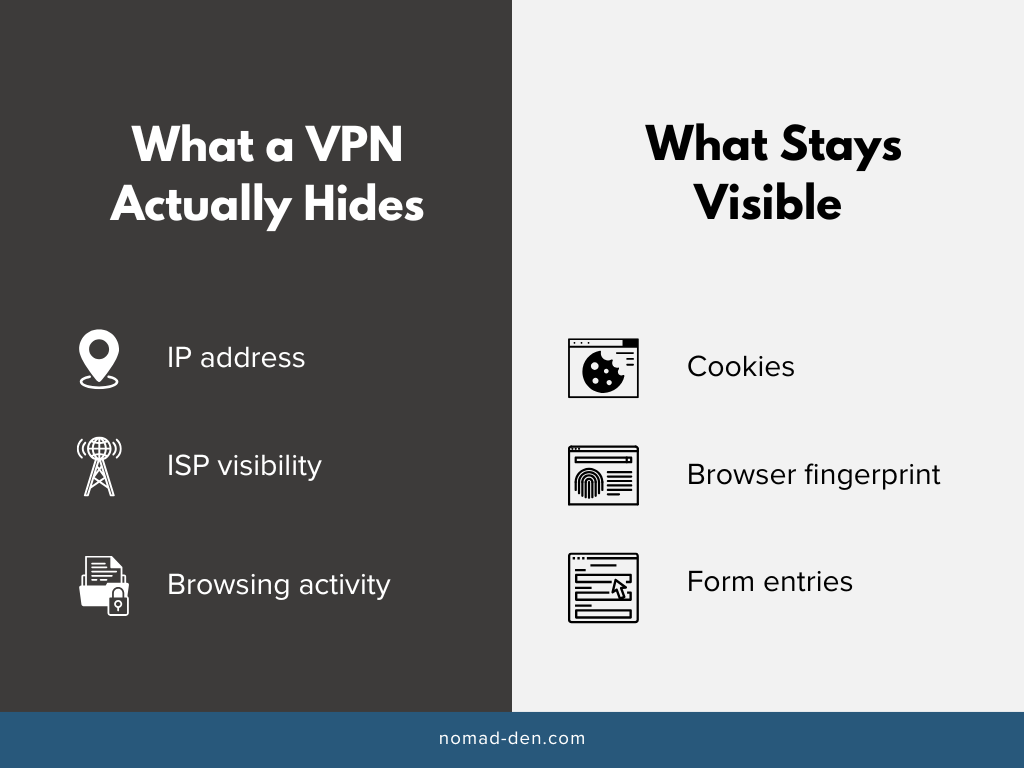
A VPN does not make you anonymous. It shifts trust from your network to your VPN provider, which is why choosing a reputable one with an audited no-logs policy matters more than almost any other decision in this whole process.
A VPN also won’t stop cookies, browser fingerprinting, or the tracking that happens the moment you type your email into a form. And it’s not the same tool as Tor: a VPN gives you privacy and a change of location, not the multi-layered anonymity that comes from onion routing.
Not every VPN app actually encrypts your traffic. A 2016 academic analysis of 283 free-to-download Android VPN apps found that 18% implemented tunneling protocols with no encryption at all, and 82% requested permissions to access sensitive data like contacts, accounts, and text messages, often unrelated to the app’s stated purpose. Two-thirds also embedded third-party tracking libraries for advertising. That’s still close to the reality of the free VPN market in 2026.
VPN Protocols, in Plain English
Most people never need to touch this setting, but it helps to know what’s happening under the hood. A VPN protocol is the set of rules that decides how your device and the VPN server encrypt data and agree on a secure connection. Different protocols make different tradeoffs between speed, security, and how easily they get blocked.
WireGuard is the modern standard. Its entire codebase is small enough that security researchers can actually read through all of it, which makes it easier to audit for flaws than older, sprawling alternatives. That smaller codebase is also part of why it’s generally the fastest option available, which is why NordVPN built its own version, NordLynx, around it.
OpenVPN is the older standard, built in the early 2000s and still widely supported. It’s slower and more complex to configure, but that complexity gives it more flexibility, and its traffic pattern is harder for restrictive networks to detect and block. That’s why it’s still the better choice in a handful of countries and networks that actively block WireGuard’s traffic pattern.
In 2026, several major providers, including NordVPN, have started layering post-quantum encryption on top of these protocols. That means even if someone recorded your encrypted traffic today, a future quantum computer capable of cracking today’s encryption still couldn’t read it. Get started with NordVPN.

Is Using a VPN Legal?
In the United States and most countries, yes. A handful of countries restrict or partially ban VPN use, including China, Russia, the UAE, Egypt, and Myanmar. See our country-by-country VPN legality breakdown if you’re traveling somewhere with restrictions.
This isn’t legal advice, and rules shift, so check current regulations for any country you’re traveling to or working from before relying on a VPN there.
How to Choose a VPN
A few criteria matter more than the rest:
- An independently audited no-logs policy, not just a claim on the homepage. Anyone can promise not to log your activity. Only a third-party audit actually verifies it.
- A kill switch that cuts your internet if the VPN connection drops. Without one, a dropped connection briefly exposes your real IP and unencrypted traffic.
- Support for WireGuard or an equivalent modern protocol. It’s faster and built from a smaller, more auditable codebase than older tunneling standards.
- A jurisdiction outside aggressive data-retention laws. Where a provider is legally based determines what it can be compelled to hand over, and to whom.
- Device limits that actually match how many things you need to connect. A cheap plan that only covers three devices stops being cheap once you’re paying for a second subscription to cover the rest.
Once you know what to weigh, comparing actual providers is the next step. Our full VPN comparison checks seven of them against these exact criteria, with current pricing and audit details for each.
FAQs
Conclusion
A VPN closes one specific gap: what your ISP and whatever network you’re on can see. It won’t make you anonymous, and it isn’t a substitute for the habits that stop most actual attacks, like unique passwords and two-factor authentication. Cybersecurity Basics covers those, and where a VPN fits alongside them.
Related Posts
Private Browsers and Search Engines Worth Switching To
Google Chrome accounts for roughly 69% of the world’s web page views, and Google handles…

When to Start Outsourcing: How to Vet Your First Virtual Assistant (or Freelancer)
Outsourcing makes sense the moment a task is both teachable and consistently the thing standing…

17 Cybersecurity Terms Every Online Business Should Know (Part 2)
Cybersecurity terms for online business owners cover the threats, compliance requirements, and protective habits that…

Affiliate Marketing Scams: How to Spot Them (and Protect Your Own)
Affiliate marketing is a legitimate, commission-based business model, not a scam, that predates the internet…

Digital Nomad Visas in 2026: Requirements, Costs, and How to Apply Safely
A digital nomad visa is a temporary residency permit that lets you legally live in…
Is NordVPN Actually Worth It? Ownership, Audits, and Pricing Explained
NordVPN is the VPN provider most affiliate marketers default to recommending, but the research behind…