Some links in this post may be affiliate links. I may earn a commission at no extra cost to you.
Table of Contents
- What Is PHP2Shell?
- Should WordPress Site Owners Worry About PHP2Shell?
- Why a WordPress Update Won’t Fix PHP2Shell
- How to Check Your WordPress PHP Version (and Whether It’s Patched)
- What to Ask Your Host
- What I Found When I Checked My Own Site
- What Not to Do (and What to Do Instead)
- What PHP Version Should WordPress Use?
- FAQs
- Check the Number, Not the Promise
- Related Posts
PHP2Shell is a pair of critical security flaws in PHP, the software every WordPress site runs on, and no WordPress update can fix it. The fix has to come from whoever runs your server, which for most site owners means the hosting company. PHP powers about 7 in 10 websites with a known server-side language, according to W3Techs’ PHP usage data, and every WordPress site in that count runs on PHP.
I run Nomad Den on WordPress, so I checked my own site the week the fix came out. Below is what PHP2Shell is, whether you need to worry, how to check your WordPress PHP version, and what I found when my dashboard didn’t match what my host was telling me.
What Is PHP2Shell?
PHP2Shell is the nickname for two vulnerabilities in PHP that let an attacker run their own code on a web server without logging in. Security teams call this remote code execution, and it sits near the top of the list of website flaws. Both issues scored 9.2 out of 10 on CVSS, the industry’s standard severity scale, which puts them in the critical range, according to PHP’s pre-release announcement. PHP released the fixes on October 21, 2026, in its official security advisory.
The two flaws are tracked as CVE-2026-109618 and CVE-2026-109619. A CVE is simply a public ID number for a known vulnerability. You don’t need the technical details to protect your site, only the version numbers that fix it.
| PHP branch | Fixed in |
|---|---|
| 8.5 | 8.5.12 |
| 8.4 | 8.4.27 |
| 8.3 | 8.3.36 |
| 8.2 | 8.2.35 |
| 8.1 and older | No official fix |
Those numbers come from PHP’s advisory, which also notes that PHP 8.1 and older no longer receive updates from the PHP project.
Should WordPress Site Owners Worry About PHP2Shell?
Take it seriously, but for most WordPress site owners the job is to verify the fix, not to install it. The patch lives on the server, so on most hosting plans your host applies it for you. How much risk you carry depends on how your site is hosted.
Has anyone actually been hacked through PHP2Shell? The attacks are real, though the confirmed successes so far hit decoys. CISA, the U.S. government’s cybersecurity agency, said in its October 23 update that it hadn’t seen a successful attack. On October 24, attackers took control of decoy servers built to lure hackers, SecurityWeek reported. If a site runs an unpatched PHP version, assume someone is already trying it.
On Shared or Managed Hosting
Your host runs PHP for every site on its servers, so your host installs the fix. You can’t patch PHP from your WordPress dashboard, and you don’t need to. Your part is confirming it happened, so see how to check your PHP version below.
On a VPS or Server You Manage
If you rent a virtual private server (VPS) and installed PHP yourself, the update is your job. PHP’s advisory is clear that updating to a fixed version is the only complete solution. If managing PHP sounds unfamiliar, managed hosting may suit you better, and our web hosting comparison explains the difference.
On PHP 8.1 or Older
Older versions get no official fix from the PHP project. Some hosts and Linux vendors patch older versions on their own, so ask yours. The safer move is upgrading to a supported version, covered at the end of this post.
Why a WordPress Update Won’t Fix PHP2Shell
WordPress, your theme, and your plugins all run on top of PHP, so updating them never touches PHP itself. Picture your site in layers: your content, then plugins and themes, then WordPress, then PHP on the server underneath. You update the top layers from your dashboard. The bottom layer belongs to whoever runs the server.
That’s also why a security plugin can’t patch this one. Wordfence warned site owners that WordPress automatic updates will not apply the fix. If you’re newer to how WordPress and hosting fit together, WordPress for Beginners walks through the setup.
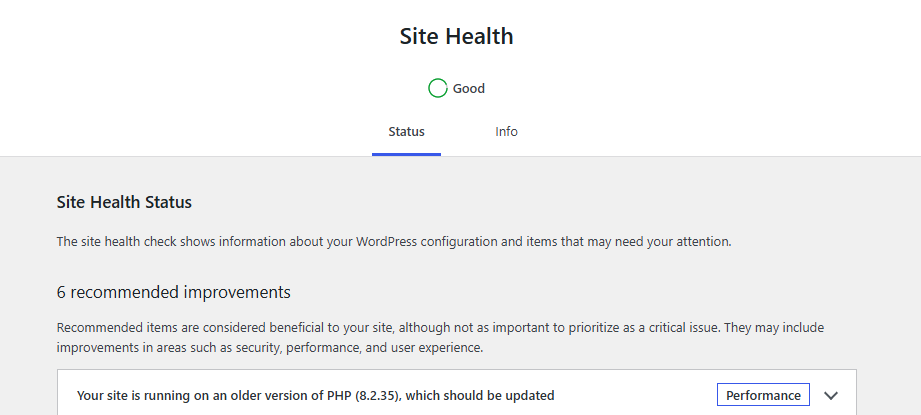
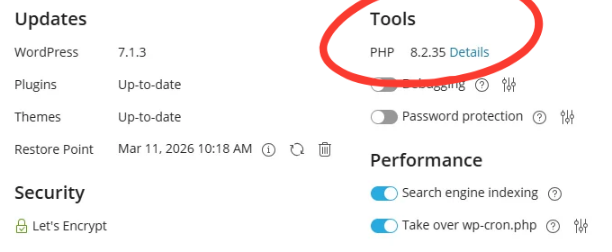
Site Health after the patch: PHP 8.2.35, with WordPress still recommending a newer version.
The other five items are routine maintenance, unrelated to PHP2Shell.
How to Check Your WordPress PHP Version (and Whether It’s Patched)
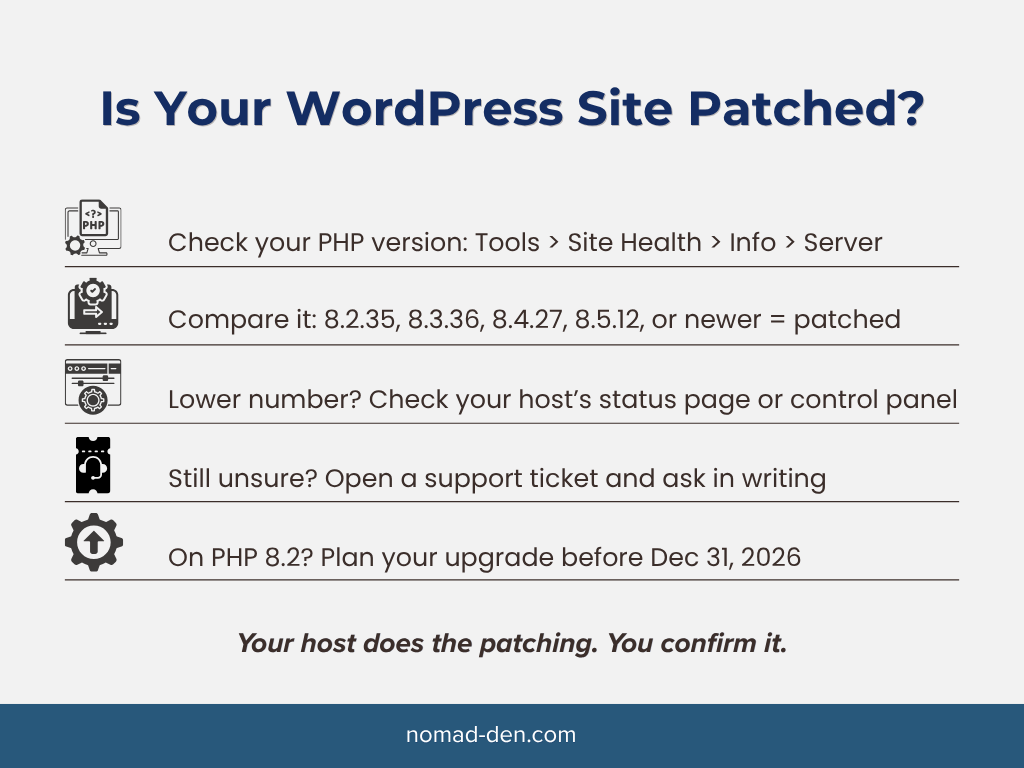
You can check your WordPress PHP version in about two minutes from your dashboard. Go to Tools, then Site Health, and click the Info tab near the top of the page. Expand the Server section, and your PHP version is near the top.
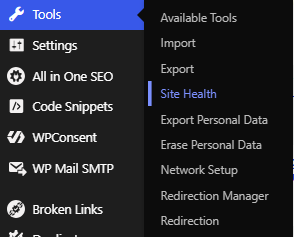
Compare your number to the table above. If it matches the fixed version for your branch, or is newer, your site is patched.
A lower number doesn’t always mean you’re unpatched. Some hosts add the fix to the version you already run without changing its number. Hosting.com’s status page said exactly that, adding that a patched server shows an October 21 build date, and Hostinger posted the same caution.
If your number is lower or you can’t find Site Health, confirm it one of these ways:
- Your host’s status page. Search “[your host] status” and look for a PHP or security maintenance notice.
- Your hosting control panel. Panels like Plesk and cPanel show the PHP version your site runs, usually in the site’s settings or tools.
- A support ticket. Ask in writing, so you have the answer on record.
On my own site, the control panel gave me a clear answer in seconds
What to Ask Your Host
If your PHP version is below the fixed release, or you can’t find it, open a support ticket with three questions. Use a ticket instead of live chat so you get a written answer you can keep.
- Has the October 21, 2026, PHP security fix (CVE-2026-109618 and CVE-2026-109619) been applied to my server?
- Which PHP version and build is my site running?
- Is my PHP version still supported, and when should I plan to upgrade?
Some hosts, mine included, don’t share build dates. If yours doesn’t, the status page and your control panel are the next best proof.
What I Found When I Checked My Own Site
My host handled the patch quickly, with only a short interruption. Hosting.com took my site offline for a brief PHP maintenance window on October 21, 2026, starting hours before PHP even published the fix, and its status page posted updates until the work was marked resolved the next day. While the rollout finished, my Site Health still showed PHP 8.2.34, and Hosting.com’s support chatbot, Orbi, assured me the fix was in place and there was nothing to worry about. It was right. By October 25, my control panel and Site Health both showed 8.2.35, the officially fixed release, and I didn’t have to do a thing.
What Not to Do (and What to Do Instead)
The fastest way to make this worse is grabbing a fix from someone you don’t know. Unofficial “PHP2Shell” tools appeared online within days of the announcement. Here’s what to skip and what to do instead.
- Don’t install “PHP2Shell protection” plugins from GitHub or unknown developers. GitHub is a public code-sharing site where anyone can publish, and nothing gets reviewed before it goes up. Some of those plugins will be honest work, some won’t, and a non-developer can’t tell the difference. Instead, confirm the patch with your host, since updated PHP is the only complete fix.
- Don’t run exploit scanners or proof-of-concept code against your site. Instead, check your host’s status page and your control panel.
- Don’t create a phpinfo file and leave it on your site. It shows your server details to anyone who finds it. Instead, use your control panel or ask support, and if you do create one, delete it right away.
- Don’t switch PHP versions without a backup. Instead, back up first, switch, then click through your key pages to make sure nothing broke.
- Don’t stop at a reassurance from support. Instead, check the version number yourself, using the steps above.
The safe path is also the simplest one: your host patches PHP, and you confirm the version number.
What PHP Version Should WordPress Use?
WordPress recommends PHP 8.3 or greater. Its official requirements page notes that WordPress still runs on older versions but that those versions “may expose your site to security vulnerabilities.”
PHP 8.2 is a deadline to plan around. According to PHP’s 8.2.35 release note, it stops receiving security fixes on December 31, 2026. If another flaw like PHP2Shell turns up after that date, 8.2 won’t get a patch. My own host’s status page went further and recommended PHP 8.4 or newer for anyone on 8.3 or older.
When you’re ready to update your PHP version, the order keeps it low-risk:
- Update WordPress, your theme, and all plugins first.
- Check that your plugins and theme support the new PHP version.
- Take a full backup.
- Change the PHP version in your hosting control panel.
- Click through your homepage, a few posts, and any forms to make sure everything works.
If something breaks, switch back to the old version in the same setting and restore your backup if needed. Hosting.com’s guide also suggests making sure WordPress, your theme, and every plugin are up to date, even deactivated ones, if problems show up after a switch.
FAQs
Check the Number, Not the Promise
PHP2Shell is serious, but for most WordPress site owners the fix is already on the server, and your job is to confirm it. Check your PHP version in Site Health or your hosting control panel, compare it to the fixed releases, and ask your host in writing if the number doesn’t add up.
My own check showed how smoothly this can go: my host patched the server, and a quick look at my dashboard confirmed it. If your site runs PHP 8.2, put December 31 on your calendar now, since that’s when the fixes stop. Patching is one habit among several that keep a small business site safe.
Build the rest of your security habits with our cybersecurity basics guide.
Some links in this post may be affiliate links. I may earn a commission at no extra cost to you. Learn more here.
Related Posts

Freelance Scams: How to Spot a Fake Client Before It Costs You
A fake-client scam is when someone poses as a paying client to take your money,…
Best Free Tools for Content Creators (and What They Really Cost)
The best free tools for content creators cover four main jobs: planning what to make,…
Private Browsers and Search Engines Worth Switching To
Google Chrome accounts for roughly 69% of the world’s web page views, and Google handles…
When to Start Outsourcing: How to Vet Your First Virtual Assistant (or Freelancer)
Outsourcing makes sense the moment a task is both teachable and consistently the thing standing…

17 Cybersecurity Terms Every Online Business Should Know (Part 2)
Cybersecurity terms for online business owners cover the threats, compliance requirements, and protective habits that…

Affiliate Marketing Scams: How to Spot Them (and Protect Your Own)
Affiliate marketing is a legitimate, commission-based business model, not a scam, that predates the internet…