Table of Contents
- What Makes an Email Provider Private?
- What Gmail Does With Your Inbox in 2026
- Why Your Inbox Matters When You Run a Business Online
- Encrypted Email Providers Compared
- Proton Mail vs. Tuta: Which Should You Pick?
- What I Found Testing Free Private Email Accounts
- Can a Private Email Provider Hand Over Your Data?
- Using a Private Email Provider for Your Business
- Email Aliases: An Easier First Step
- How to Switch Without Losing Mail or Accounts
- FAQs
- Choose the Level of Privacy You Need
- Related
Secure email providers keep your inbox from being scanned, profiled, or read by the company that runs it, and the strongest ones encrypt stored mail so even the provider can’t open it. The FBI’s Internet Crime Complaint Center recorded more than $3 billion in business email compromise losses in 2025, and your inbox is the reset button for nearly every account your business runs on.
This post continues the DeGoogle series that started with Why DeGoogling Actually Matters in 2026 and Private Browsers and Search Engines Worth Switching To. It compares the private email providers I’d consider in 2026: what each one can still see, what the free plans include, and which ones work for a business domain. Nomad Den’s email still runs on Google Workspace, so this is also my own research into whether I can switch, starting with free Proton and Tuta accounts to see what they block and where their mail lands.
What Makes an Email Provider Private?
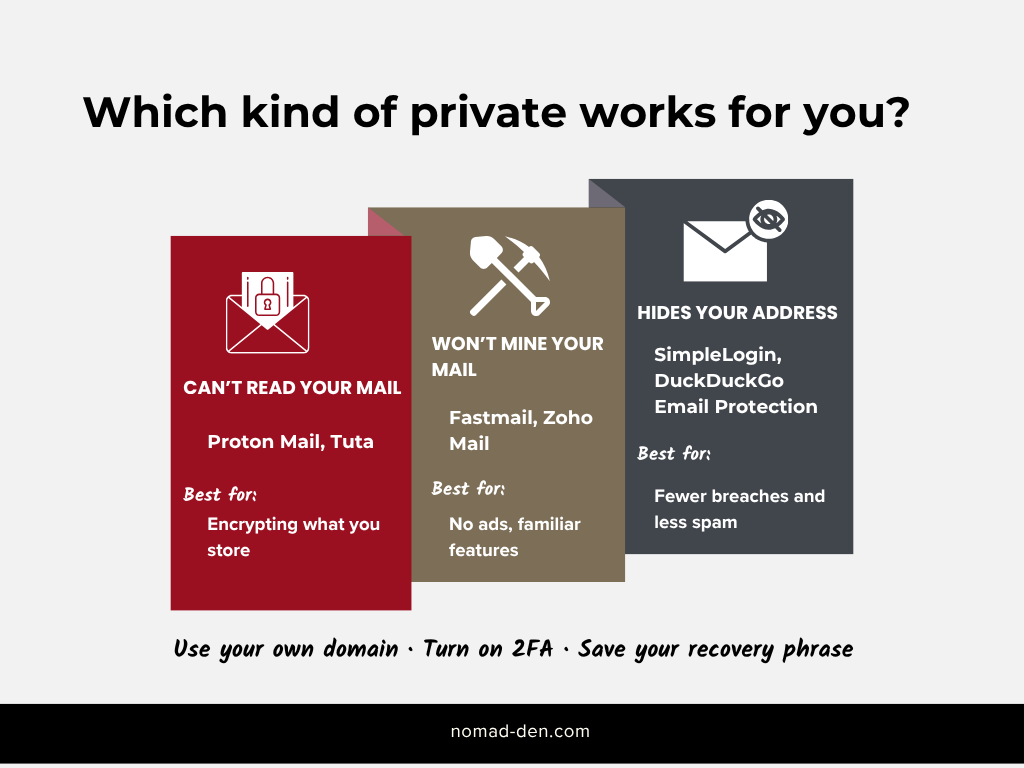
A private email provider doesn’t scan your messages for advertising or profiling, and the most private ones can’t read your stored mail at all. The word “private” covers three different promises, and providers rarely say which one they’re making:
- Can’t read your mail: stored messages are encrypted with keys only you hold (Proton Mail, Tuta)
- Won’t mine your mail: the company can technically access messages but doesn’t use them for ads (Fastmail and Zoho Mail)
- Hides your real address: aliases forward mail to your inbox, so sites and breaches never see your main address (SimpleLogin, DuckDuckGo Email Protection)
Each tier solves a different problem. Knowing which one you need keeps you from paying for encryption you won’t use, or trusting a provider with more than you meant to.
End-to-End vs. Zero-Access Encryption
End-to-end encryption means a message is encrypted on the sender’s device and only decrypted on the recipient’s, so no server in between can read it. Between two Proton Mail users, or two Tuta users, that happens automatically.
Zero-access encryption means your provider encrypts stored mail with a key only you hold, so the company can’t read it. It’s how Proton and Tuta protect mail that arrives from everyone else, like an invoice from a client on Gmail: the message travels the normal way, then gets encrypted as it lands in your inbox. A copy still sits with the sender’s provider, though, and anything you write to a Gmail user is only protected in transit unless you use a password-protected message or PGP. PGP (Pretty Good Privacy) is an older encryption standard that works between any two providers, but both people have to set it up and trade keys first.
What Encrypted Email Still Can’t Hide
Even with end-to-end encryption, email can’t hide who you write to or when. Servers need the sender, recipient, and date to deliver a message, so that information stays readable to every provider that handles it.
Subject lines vary by provider. Tuta encrypts them, while Proton encrypts them in storage but not end to end. For something truly sensitive, like sending a contractor the login to a client account, an encrypted messenger is the better tool. Email works best for receipts, account alerts, newsletters, and everyday client conversations.
What Gmail Does With Your Inbox in 2026
Gmail is well protected against outside attackers, but it isn’t private from Google. Google stopped scanning Gmail content for ads in 2017, but an October 2026 update to that same announcement adds a catch. If you connect Gmail to other Google services, that data can be used to personalize them and, depending on your settings, to show ads, as Google’s privacy policy now states. Your inbox also feeds other features:
- Smart features: inbox sorting, Smart Compose, and summary cards all use your email content, and Google says that data “may be used to improve these features.” They’re off by default only in the EEA, Japan, Switzerland, and the UK
- Gemini Personal Intelligence: since January 2026, Gemini can draw on your Gmail to answer questions if you connect it. Connecting apps is off by default, and Google says Gemini “doesn’t train directly on your Gmail inbox.” It started reaching free US accounts in March 2026
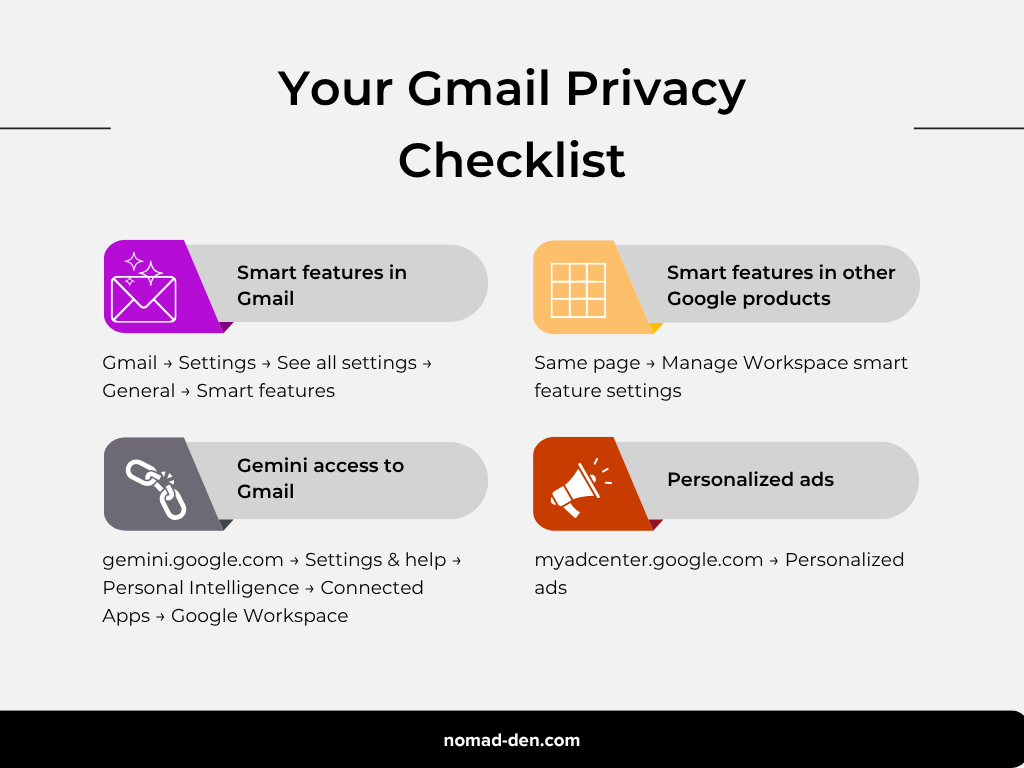
When I checked my own account, Google Workspace was listed under “All” with an add button, not under “Installed,” so Gemini had no access to my Gmail. All of this can be found on Google’s own help pages. The real question is whether you want client conversations, invoices, and account alerts feeding those systems at all. If you stay with Gmail for now, you can switch smart features off under Settings, then General, then Smart features.
Why Your Inbox Matters When You Run a Business Online
Your email address is the recovery key for almost every account you own. Payment processors, affiliate networks, hosting, social profiles, and banks all send password resets there, so whoever controls your inbox can take over the rest.
A private provider doesn’t stop phishing, which was the most reported crime type in 2025, with 191,561 complaints. Fake invoices and fake client emails reach encrypted inboxes too, which is why it pays to learn the signs of a fake client and lock down the account itself. What a private provider changes is who else can read the mail sitting in your inbox.
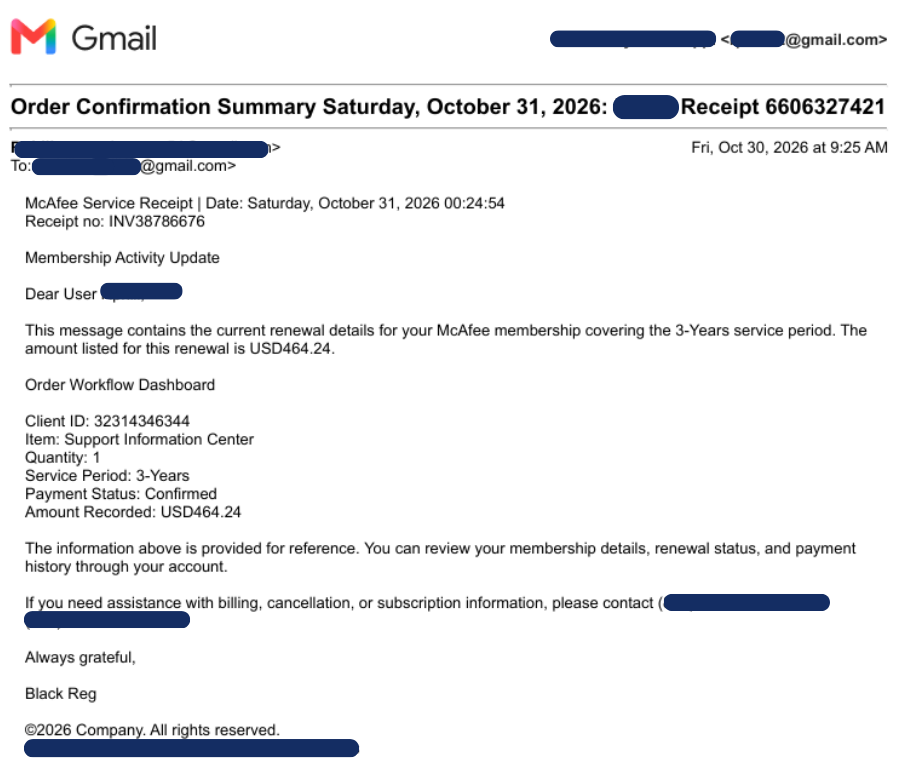
One landed in my own spam folder this week: a fake McAfee “renewal invoice” for $464.24, with a phone number to call for a refund. The sender’s display name was my own name, so at a glance it looked like I’d sent it to myself. It actually came from a random Gmail account, which is why it passed every authentication check. SPF, DKIM, and DMARC only prove an email came from the servers it claims; they don’t prove the sender is honest. Tech support scams like this cost victims more than $2.1 billion in 2025.
Encrypted Email Providers Compared
For most people, the best encrypted email providers are Proton Mail and Tuta: both have free plans, and both keep stored mail unreadable to the company. The others below fit narrower needs, like using a desktop email app, adding a business domain cheaply, or a familiar inbox without ads. In the table, “desktop email apps” means programs like Microsoft Outlook or Thunderbird (Mozilla’s free email app), which connect to your account through a standard called IMAP.
| Provider | Based in | Who can read stored mail | Free option | Custom domain from | Desktop email apps (IMAP) |
|---|---|---|---|---|---|
| Proton Mail | Switzerland | Not Proton (zero-access) | Free plan, 1 GB, 1 address, 150 emails a day | $3.99/mo (12-month plan) | Paid plans, through Bridge |
| Tuta | Germany | Not Tuta, including subject lines | Free plan: 1 GB, 1 address (personal use only) | €3/mo (yearly) | No |
| Fastmail | Australia | Fastmail (not end-to-end encrypted) | 30-day trial | $5/mo (yearly) | Yes |
| Zoho Mail | US and India | Zoho (not end-to-end encrypted) | Free plan: up to 5 users, 5 GB each | Free in select regions | Paid plans |
Prices are as of November 2026, in each provider’s own currency, and they change often. Check the pricing page before you buy.
Each profile below covers what the table can’t: what the encryption covers, what comes with the account, and the catch.
Proton Mail
- Encryption: zero-access for stored mail and end-to-end between Proton users; subject lines are encrypted in storage but not end to end
- Extras: calendar and drive in the same account, 10 hide-my-email aliases with the free Proton Pass, and Gmail import through Easy Switch
- Watch out for: Proton is moving parts of its infrastructure out of Switzerland, starting with Germany, over a proposed Swiss surveillance law, and its leadership is under fire over AI-written code (see Can a Private Email Provider Hand Over Your Data?)
Proton Mail is the most complete Gmail replacement on this list. It has apps on every platform and keeps mail, calendar, files, and passwords in one account. Its code was independently audited before its 2021 redesign, and it publishes a yearly transparency report.
Tuta
- Encryption: end-to-end for mail between Tuta users, plus subject lines, contacts, and calendars, with post-quantum key exchange
- Extras: encrypted calendar and contacts; the Revolutionary plan includes 20 GB and up to 3 custom domains
- Watch out for: inactive free accounts are deleted after six months, and search runs on your device, so it can be slower on a large mailbox
Tuta encrypts more of your mailbox than any other provider here, at the lowest price for a business domain. It only works in its own web, desktop, and phone apps, which won’t matter if you mostly use a browser and your phone.
Fastmail (Private, Not Encrypted)
- Encryption: stored mail is encrypted on disk, but the keys stay with Fastmail, so it isn’t end-to-end
- Extras: Masked Email aliases built in, and a choice of EU or US data storage
- Watch out for: the company can access your mail, and it’s based in Australia, so Australian law applies
Fastmail feels the most like Gmail of any provider here, without the ads, and it trades encryption for speed. The company says skipping end-to-end encryption is deliberate, since fast search and spam filtering need the server to read content.
Zoho Mail (Free Business Option)
- Encryption: standard encryption in transit and storage; not end-to-end
- Extras: part of Zoho’s office suite; paid Mail Lite starts at $1 per user a month
- Watch out for: Zoho can access your mail, and the free plan has no desktop email app access
Zoho Mail is the cheapest way to put a professional address on your own domain. Treat it as a Google Workspace alternative, not an encrypted one.
Proton Mail vs. Tuta: Which Should You Pick?
Pick Proton Mail if you want the most complete Gmail replacement, and Tuta if you want the most encryption for the lowest price.
| Proton Mail | Tuta | |
|---|---|---|
| Best for | The most complete Gmail replacement | The most encryption for the price |
| Subject lines | Encrypted in storage, not end to end | End-to-end encrypted |
| Desktop email apps | Through the paid Bridge | Not supported |
| Custom domain | From $3.99/mo, 1 domain | From €3/mo, up to 3 domains |
| Extras | VPN, drive, and password manager on larger plans | Mail, calendar, and contacts |
| Location | Switzerland, servers moving to Germany | Germany |
Both free plans are good enough to test for a few weeks before you move anything important. Run them side by side with the same newsletter or two and see which one you open first.
What I Found Testing Free Private Email Accounts
I opened free Proton Mail and Tuta accounts on November 6 and ran the same checks on each: what signup asked for, what each one blocked when I sent it one of my own Nomad Den emails, and where its messages landed in a Gmail inbox. Tuta’s account took 48 hours to approve, so its tests ran two days later.
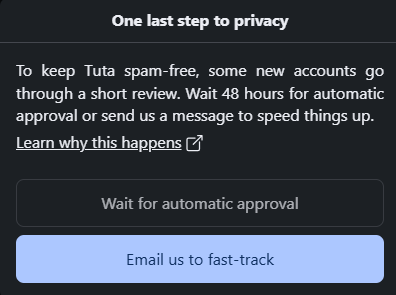
Tuta’s review screen after signup.
Both providers blocked my newsletter’s tracking pixel by default, so Systeme.io couldn’t record an open just from reading the email. The only open it logged came from Proton after I clicked a link, since a click shows the email was opened.
The bigger difference showed up in Gmail. Both messages from my new Proton account landed in spam, even though each passed SPF, DKIM, and DMARC, while my message from Tuta went straight to the inbox. With only a few messages, that isn’t proof Proton always lands in spam, but it’s a reason to send a test to a friend’s Gmail before you rely on a new address.
Here’s how the two compared on each check:
| Provider | Signup asked for | Account recovery (copy or PDF) | Blocked my email’s tracking pixel? | Landed in Gmail | SPF / DKIM / DMARC |
|---|---|---|---|---|---|
| Proton Mail | Username, password, CAPTCHA | 12-word recovery phrase | Yes, 1 tracker blocked, but Systeme.io still logged an open and a click | Spam (both messages) | All pass |
| Tuta | Username, password; one free account per person, personal use only; 48-hour review | 64-character recovery code | Yes; images blocked by default, no open recorded | Inbox | All pass |
Can a Private Email Provider Hand Over Your Data?
Yes, every email provider has to follow the law where it’s based, but encryption limits what it can hand over. Proton received 9,301 legal orders for Proton Mail in 2025 and complied with 8,313 of them (Proton transparency report). Tuta released account details for 28 of 215 requests in the first half of 2026 (Tuta transparency report). Neither can decrypt your stored messages, so what they hand over is account information, and both can be ordered to log a user’s IP address: Proton did that for a French activist in 2021, and Tuta says it does so only for a single account under a German court order.
Trust also depends on how a company builds its software. In late October 2026, reporting showed Proton’s CEO had dismissed an employee’s request to security-test new code as “loser thinking” while pushing staff to write code with AI, and many users on Reddit said they would cancel. Proton apologized, said AI use “will never be at the expense of security,” and promised to publish how it reviews code. My take: nothing so far points to a flaw in Proton’s encryption, but if you’re moving a business inbox there, watch whether it follows through.
Using a Private Email Provider for Your Business
If you run a business, put your email on your own domain first and choose the provider second. An address like you@yourbusiness.com can move to any provider by changing a few DNS records. An @proton.me or @tuta.com address can’t move with you.
Skiff users learned this the hard way. When Notion bought the encrypted email service in February 2024, they had a limited window to export their mail before it shut down. People on their own domain switched providers and kept their address; people on @skiff.com had to update every account they owned. A few things to check before you move a business address:
- Sending tools: platforms like Systeme.io send your newsletters through their own servers, so changing inbox providers doesn’t touch your list. You will need to update your domain’s DNS records, swapping your old provider’s entries for the new provider’s while leaving your sending tool’s records in place. Gmail requires SPF, DKIM, and DMARC from anyone sending 5,000 or more messages a day.
- Desktop email apps: Outlook and Thunderbird need IMAP, which Tuta doesn’t offer and Proton only includes on paid plans
- More than one person: shared inboxes and extra users cost more on most encrypted plans
- Account recovery: Proton and Tuta can’t decrypt your mail for you. Lose your password without your recovery phrase or code, and you can lose access to your old mail for good.
The recovery point is the one people miss. Set up a recovery method on day one and store it somewhere other than the inbox it protects. For me, switching would mean changing nomad-den.com’s DNS records and reconnecting WordPress’s site emails, not just opening a new inbox.
Email Aliases: An Easier First Step
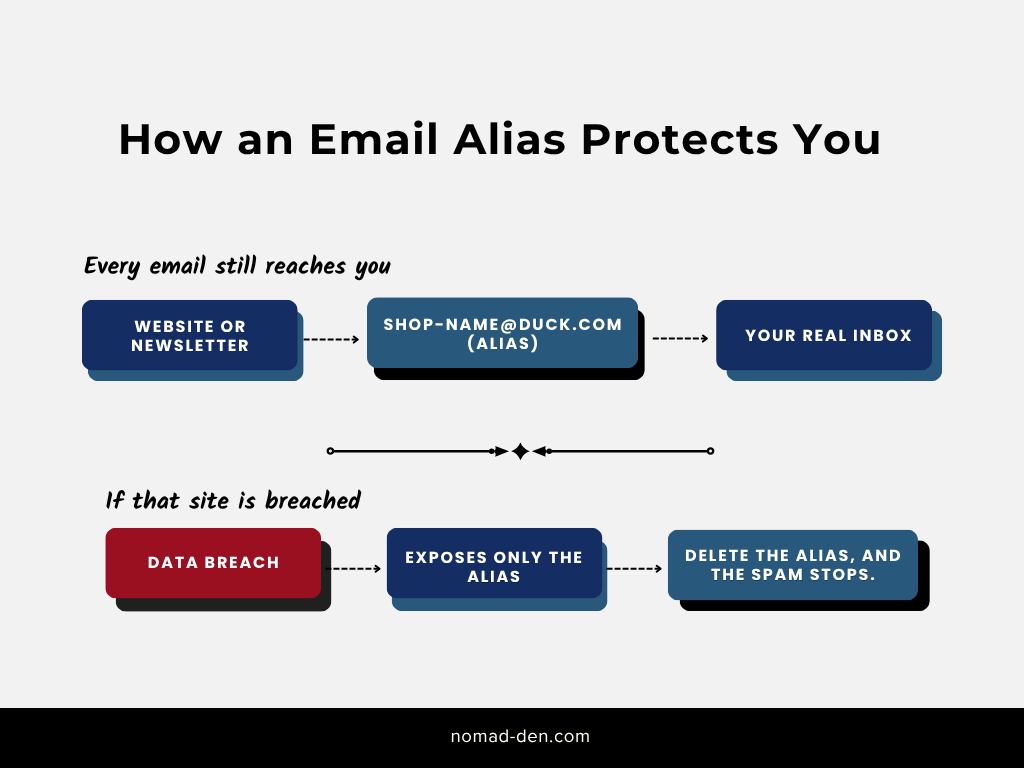
An email alias is a forwarding address that hides your real one, so breaches and spam lists never see your main inbox. Aliases work with any provider, Gmail included:
- SimpleLogin: owned by Proton since 2022; the free Proton Pass plan includes 10 aliases
- DuckDuckGo Email Protection: free @duck.com addresses that forward to your inbox and remove many trackers on the way
- Built-in aliases: Fastmail includes Masked Email on every paid plan
Aliases are the smallest change in this post. If switching providers feels like too much right now, give each new signup its own alias, and see how to remove your personal data from the internet to clean up what’s already out there.
How to Switch Without Losing Mail or Accounts
Switching providers safely comes down to order: make the new account secure before anything important points to it. Here’s the order I’d follow:
- Secure the new account. Turn on two-factor authentication and save the recovery phrase in a password manager before you move anything
- Import your old mail. Proton’s Easy Switch and similar tools pull in past messages from Gmail
- Forward new Gmail messages to the new address so nothing gets missed while you update accounts
- Update recovery emails on your key accounts: domain registrar, bank, payment processors, affiliate networks, hosting, and social profiles
- Tell clients and contacts, and update your email signature
- Keep the old account open for a few months with forwarding on, then close it or keep it as a backup
Disclosure: the NordPass link below is an affiliate link. If you sign up through it, I may earn a commission at no extra cost to you. Learn more here.
Start with the registrar and payment accounts, since those are the ones an attacker would go after first if your old address were ever compromised. NordPass can store recovery phrases and codes in its Secure Notes, encrypted in the same vault as your passwords. Keep your recovery phrases in NordPass.
FAQs
Choose the Level of Privacy You Need
Private email isn’t one thing, so start by deciding what you need it to do. If you want a provider that can’t read your mail, start with Proton Mail or Tuta. If you mainly want an inbox that isn’t feeding ads or AI features, Fastmail or Zoho Mail will do. And if switching feels like too much right now, aliases keep your real address out of the next breach without changing anything else.
For a business, the order is what counts: put your address on your own domain, lock the account down with 2FA and a stored recovery phrase, then pick the provider. Whatever you choose, your inbox is still the key to every other account you run.
Email is one step in moving away from Google, and moving your files off Drive is a natural next one. See every privacy-first alternative in one place.
Related
Private Google Drive Alternatives for Freelancers (Tested)
A private Google Drive alternative encrypts your files on your own device before they upload,…
Passkeys vs. Passwords: What Actually Changed in 2026
Passkeys are safer than passwords for nearly every account, and in 2026 that stopped being…
Saily vs. Simbye eSIM: Which Should Digital Nomads Choose?
Simbye provided its eSIM free for testing, and Saily’s affiliate team provided a free 1…

WordPress PHP Version: How to Check It After PHP2Shell
PHP2Shell is a pair of critical security flaws in PHP, the software every WordPress site…
Freelance Scams: How to Spot a Fake Client Before It Costs You
A fake-client scam is when someone poses as a paying client to take your money,…
Best Free Tools for Content Creators (and What They Really Cost)
The best free tools for content creators cover four main jobs: planning what to make,…