
Some links in this post may be affiliate links. I may earn a commission at no extra cost to you.
Table of Contents
- Why Antivirus Matters More When You’re Self-Employed
- Do You Already Have Antivirus and Not Know It?
- Free vs. Paid Antivirus: What’s the Actual Difference
- The Licensing Catch Most Freelancers Don’t Know About
- Best Antivirus Options for Freelancers and Small Business Owners
- Bitdefender: Best for Cross-Platform Coverage
- Norton: Best for Built-In Identity Protection
- Malwarebytes: Best for Simplicity and Real-Time Protection
- Surfshark One: Best If You Want VPN and Antivirus in One Subscription
- McAfee: Best for Scaling Device Coverage
- Malwarebytes for Teams: Best If You Occasionally Bring On Help
- What This Means If You Handle Client Data
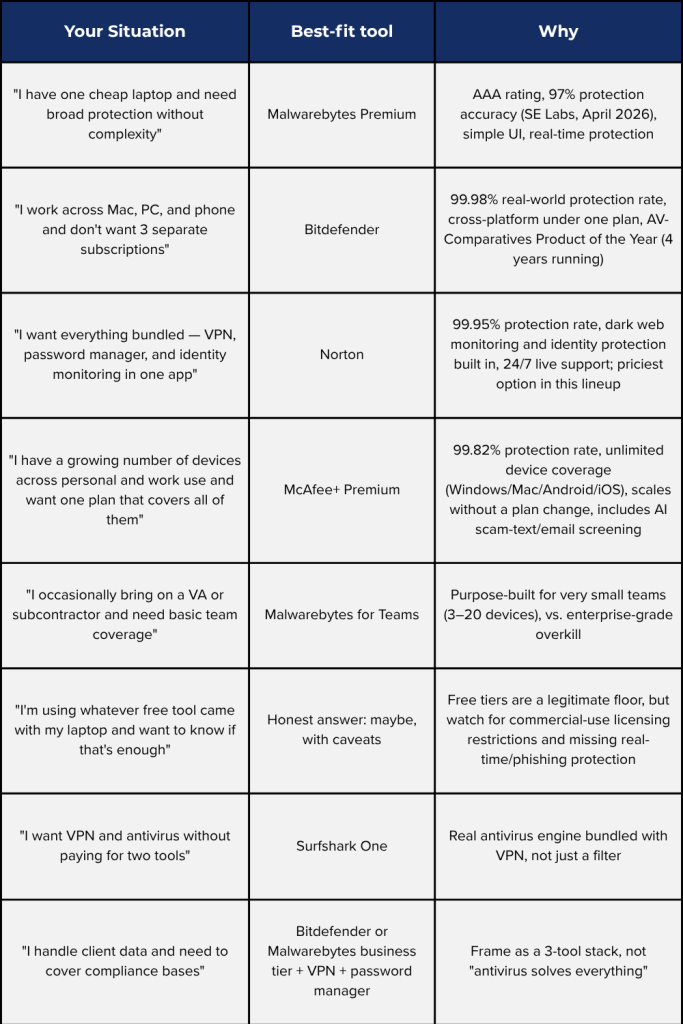
- Find Your Best-Fit Antivirus at a Glance
- Frequently Asked Questions About Antivirus
- Conclusion
- Related Posts
If you run your business off a single laptop, ‘I should probably get antivirus eventually’ isn’t a sentence you can afford to finish later. A compromised device for a freelancer or solo business owner doesn’t just mean lost files, it can mean a leaked client contract, a drained business account, or weeks of lost income while you rebuild from scratch.
This post breaks down the best antivirus options for freelancers, digital nomads, and small business owners in 2026, based on independent lab testing from AV-Comparatives, AV-TEST, and SE Labs rather than brand recognition alone, including where free tools genuinely hold up and where paid options earn their cost.
Why Antivirus Matters More When You’re Self-Employed
There’s a common assumption that small or solo operations fly under the radar of cybercriminals. However, the data says the opposite: businesses with fewer than 100 employees are now targeted at 2.5 times the rate of businesses with 500 or more staff, largely because attackers know smaller operations are less likely to have any real protection in place.
That targeting shows up in the numbers. In 2025, 61% of small businesses reported experiencing at least one cyberattack in the past year. Ransomware alone now factors into 48% of all data breaches, according to Verizon’s 2026 Data Breach Investigations Report, and recovering from a single ransomware incident costs an average of $120,000. For a freelancer or solo business owner, that’s not a line item you absorb. It can mean missed deadlines, lost clients, or being unable to operate at all while you sort it out. Verizon’s data also points to roughly 19% of breached small businesses facing the real possibility of closing as a result.
Note: You’ve probably seen the claim that “60% of small businesses close within six months of a cyberattack.” The National Cyber Security Alliance officially disavowed that number, it traces back to an unverifiable 2011 claim, not their own research, and they no longer stand behind it. The stats above are the ones backed by current, sourced data.
What makes this different for freelancers, digital nomads, and online marketers specifically isn’t just the dollar amount. It’s that there’s usually no IT department, no backup device, and no second income stream to fall back on while you deal with the fallout. Your laptop is also your storefront, your filing cabinet, and your paycheck, often all at once. That’s the lens worth using when deciding how much protection actually makes sense for your setup, which is what the rest of this post walks through.
Do You Already Have Antivirus and Not Know It?
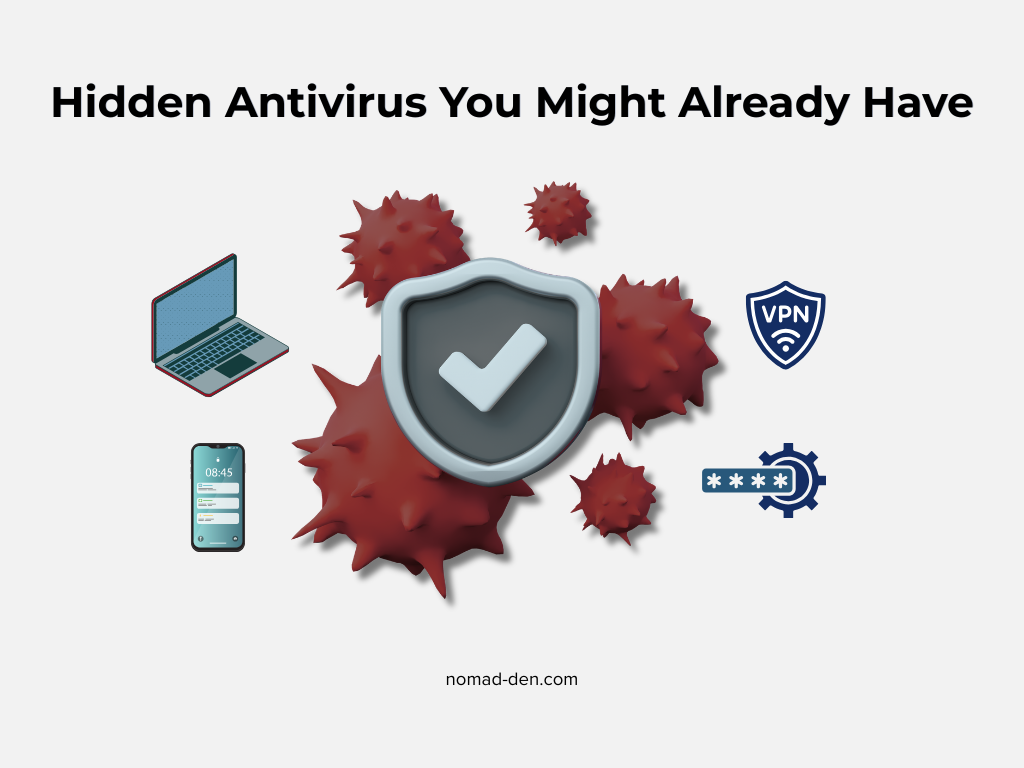
Before spending money on anything new, it’s worth checking what you might already have running. If you’re on Windows, Windows Defender comes built in and is a legitimate baseline, not a placeholder. The bigger blind spot is usually your VPN or password manager, since several now quietly bundle real antivirus protection into plans people already pay for.
Surfshark One is a good example. It pairs its VPN with an actual antivirus engine, not just a filter, and includes webcam protection and dark web monitoring on top of it. Independent testing has shown it holding up reasonably well against dedicated tools like Norton and Bitdefender, which makes it worth a look if you already use Surfshark for the VPN and didn’t realize the antivirus piece was sitting right there.
Worth knowing the difference, though: NordVPN’s Threat Protection Pro sounds similar but isn’t the same thing. It functions more like a malicious-site and download filter built into the VPN app. It doesn’t run full system scans or handle malware remediation the way a real antivirus product does. If you’re relying on it as your only protection, you have less coverage than the name implies.
For current Surfshark customers, consider Surfshark One. It is a separate plan that bundles antivirus, breach alerts, and private search in with the VPN, for just $0.30/month more than the Starter plan. If you’d rather not pay for a standalone antivirus tool, the upgrade is likely cheaper than buying one separately. The takeaway: check what’s already in your toolkit before you assume you’re starting from zero.
Free vs. Paid Antivirus: What’s the Actual Difference
Here’s something most ‘best of’ roundups get a little wrong: free antivirus tools aren’t necessarily worse at catching malware. Recent AV-TEST results show several free programs hitting top-tier detection scores, with detection rates above 99.5% for known and zero-day threats. So if your real question is ‘do I need to pay for this, or is free good enough,’ detection alone usually isn’t where the answer lives. It’s what happens after detection that often comes with a price tag: several free tools will flag a threat and then prompt you to upgrade to actually remove it, rather than resolving it on the spot.
Where free tools fall short is everything around prevention. They typically lack real-time, continuous protection, meaning you’re running manual scans instead of being monitored as threats appear. They’re also weaker against newer, evolving threats like fresh phishing sites or fake-checkout scams, since free versions tend to focus on known malware signatures rather than emerging tactics. For a freelancer clicking client links and invoices all day, that gap matters more than it would for casual home use.
The Licensing Catch Most Freelancers Don’t Know About
There’s a detail almost no one covers, and it’s directly relevant if you’re self-employed: most free antivirus tools are licensed for personal, non-commercial use only. Malwarebytes’ own terms of service, for example, grant a license for “personal and non-commercial purposes” and explicitly prohibit using the free service for commercial benefit.
That means if you’re running the free version on the same laptop you use to invoice clients, you’re technically outside the terms, even if nothing about your day-to-day usage feels “commercial.” It’s not something anyone enforces against individual freelancers in practice, but it’s worth knowing, since it’s the actual reason business-specific tiers like Malwarebytes for Teams exist separately from the free consumer product.
Best Antivirus Options for Freelancers and Small Business Owners
With the groundwork out of the way, here’s where things land for a one-person or very small operation, based on independent lab results rather than marketing claims.
*Pricing reflects rates at the time of publishing and is subject to change, check current pricing before purchasing.
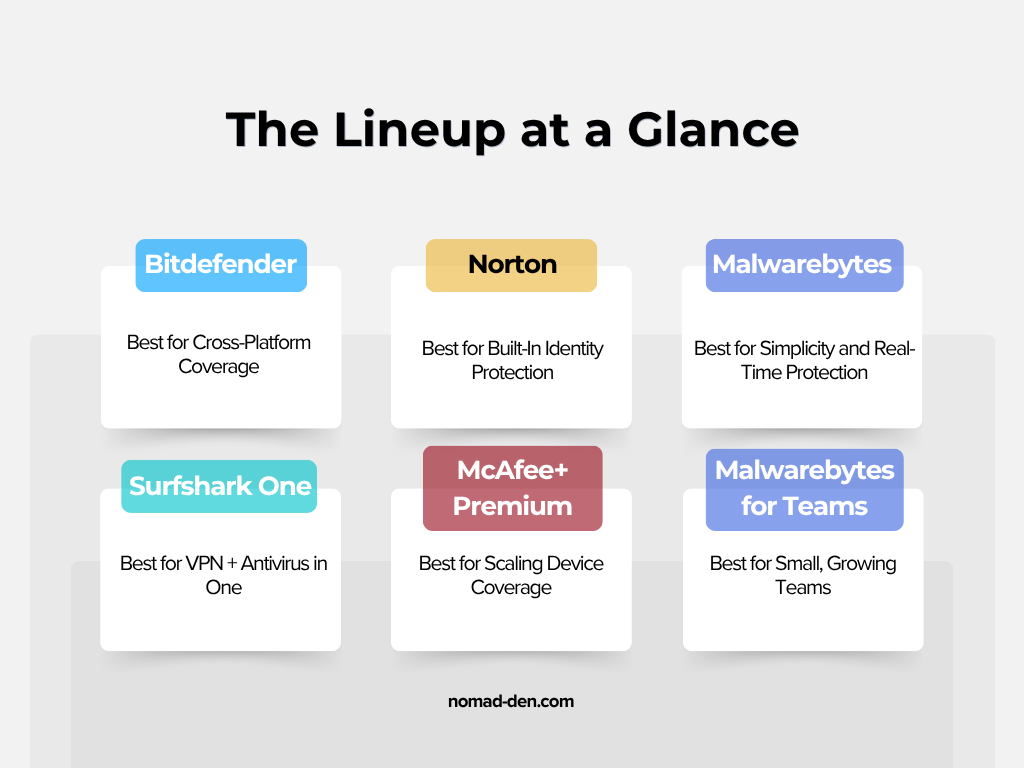
Bitdefender: Best for Cross-Platform Coverage
If you’re working across a Mac, a Windows machine, and a phone (common for anyone who’s pieced together a setup over a few years), Bitdefender is built for that. Its Small Office Security and Total Security plans cover Windows, macOS, iOS, and Android under one subscription, and it’s been named AV-Comparatives’ “Product of the Year” for four consecutive years, with a real-world protection rate of 99.98% and only two false positives across twelve tests. Plans start around $132.99 to $189.99/year depending on device count, and scale up for small teams.
Norton: Best for Built-In Identity Protection
Norton 360 posted a 99.95% real-world protection rate in AV-Comparatives’ 2025 testing, earning Gold in real-world protection alongside Kaspersky as one of the top performers in the field. What sets it apart for solo operators is what’s bundled in beyond malware detection: a VPN, password manager, and dark web/identity monitoring on the consumer plans, plus dedicated small business tiers with 24/7 live support and virus removal assistance, useful if you don’t have anyone to call when something goes wrong. Plans start around $199.99 for the first year (up to 5 employees), renewing at $299.99/year.
Malwarebytes: Best for Simplicity and Real-Time Protection
Malwarebytes Premium earned an AAA rating with 97% protection accuracy from SE Labs in April 2026, and it’s generally the easier of the two to set up and forget about. It’s a solid pick if you want one straightforward layer of real-time protection without a lot of extra features to configure. Plans start around $59.99/year for 3 devices, with a higher Ultimate tier ($139.99/year) adding identity monitoring and a VPN if you want everything bundled together.
Surfshark One: Best If You Want VPN and Antivirus in One Subscription
Covered above, but worth repeating here as a direct option: if you’re already paying for a VPN, Surfshark One bundles real antivirus protection into that same subscription instead of paying for two separate tools. Pricing starts at $2.79/month on longer-term plans, and with Surfshark One you also get antivirus, real-time alerts for data breaches, and private search on your browser, for only $0.30 more/month (see current Surfshark pricing).

McAfee: Best for Scaling Device Coverage
McAfee posted a 99.82% protection rate in the same AV-Comparatives round, just behind Norton and Bitdefender. Where it stands out is flexibility as your setup grows: McAfee+ Premium covers unlimited devices across Windows, Mac, Android, and iOS, and licensing scales easily as you add machines instead of forcing a plan change. It also includes McAfee Scam Protection, which screens texts, emails, and links for AI-generated scam attempts, a relevant add-on given how much invoice and phishing fraud now targets freelancers directly. Pricing starts around $39.99 for the first year, renewing near $84.99.
Malwarebytes for Teams: Best If You Occasionally Bring On Help
If you ever loop in a VA, subcontractor, or part-time collaborator, Malwarebytes for Teams scales by device count rather than a flat rate: Sole Proprietor covers 3 devices, Boutique Business covers 10, and Small Office covers 20, all starting around $119/year at the entry tier. That tiering matters here since it means you’re not stuck paying for 20-device coverage just because you brought on one subcontractor for a month.
Note: McAfee also sells a product called Small Business Security, but it’s bundled exclusively with Dell PCs rather than sold as a standalone subscription. If you’re on Dell hardware, check whether it’s already included before buying anything separately. For everyone else, McAfee+ Premium above is the relevant comparison.
What This Means If You Handle Client Data
If you work with clients based in the EU, or your business touches EU residents’ data in any way, GDPR can apply to you regardless of where you’re physically working. That’s a detail a lot of freelancers and digital nomads miss, since it’s easy to assume rules like this only apply to companies with a physical EU presence. They don’t. If a breach happens and EU client data is involved, there are notification requirements (often within 72 hours of discovery) that don’t bend just because you’re a one-person operation.
Antivirus software is one piece of meeting that bar, not the whole answer. Pairing it with encryption, a password manager, and a VPN on public networks covers the basics most client contracts and data protection rules expect.
A quick disclaimer here, since this varies by jurisdiction and by client: this isn’t legal advice. If you’re regularly handling client data internationally, it’s worth a conversation with a qualified professional about what specifically applies to your situation.
Find Your Best-Fit Antivirus at a Glance
Frequently Asked Questions About Antivirus
Conclusion
The honest version of “do I need antivirus” for anyone running a one-person business is yes, but the harder it is to answer is which one and why. Free tools aren’t as weak as people assume, paid tools aren’t automatically worth the upgrade for everyone, and the protection that actually matters most for freelancers and digital nomads (cross-device coverage, real-time monitoring, and knowing what you’re already licensed to use commercially) rarely gets covered in the generic “best of” lists built for home users.
Start with what you actually have already, check whether your VPN or password manager is quietly covering more than you realized, and pick the tool that matches how you actually work rather than the one with the biggest name attached. The cost of getting this wrong isn’t abstract. It’s the laptop your business runs on.
Related Posts
Private Browsers and Search Engines Worth Switching To
Google Chrome accounts for roughly 69% of the world’s web page views, and Google handles…
When to Start Outsourcing: How to Vet Your First Virtual Assistant (or Freelancer)
Outsourcing makes sense the moment a task is both teachable and consistently the thing standing…

17 Cybersecurity Terms Every Online Business Should Know (Part 2)
Cybersecurity terms for online business owners cover the threats, compliance requirements, and protective habits that…

Affiliate Marketing Scams: How to Spot Them (and Protect Your Own)
Affiliate marketing is a legitimate, commission-based business model, not a scam, that predates the internet…
Digital Nomad Visas in 2026: Requirements, Costs, and How to Apply Safely
A digital nomad visa is a temporary residency permit that lets you legally live in…
Is NordVPN Actually Worth It? Ownership, Audits, and Pricing Explained
NordVPN is the VPN provider most affiliate marketers default to recommending, but the research behind…