Some links in this post may be affiliate links. I may earn a commission at no extra cost to you.
Simbye provided its eSIM free for testing, and Saily’s affiliate team provided a free 1 GB data code. The results and opinions here are my own.
Table of Contents
- Saily vs. Simbye: Quick Comparison
- How I Tested Saily and Simbye
- Speed Test Results
- Why Saily’s Ping Ran Higher
- Simbye eSIM vs. Saily: Phone Numbers, Calls, and Texts
- Security and Privacy Differences
- Plans, Pricing, and Refunds
- Setup and Install Experience
- Which eSIM Should Digital Nomads Choose?
- FAQs
- Faster Data or a Real Number
- Related Posts
Saily was faster than Simbye in my side-by-side tests at both locations, while Simbye’s plan came with a real US phone number. Saily sells a number as an add-on, but my test plan didn’t include one. I tested both travel eSIMs on the same phone, at the same two spots.
With 18.5 million American workers living as digital nomads in 2025, according to MBO Partners, choosing a travel eSIM is a practical decision. This post covers only what I tested and recorded: speed, latency, phone numbers, security, pricing, and setup.
Saily vs. Simbye: Quick Comparison
Saily delivered faster downloads and uploads in my tests, while Simbye had lower idle latency and a working US phone number. The table below sums up what I measured and what each provider offers.
| Saily | Simbye | |
|---|---|---|
| Download, home (median) | 5.81 Mbps | 4.61 Mbps |
| Download, remote spot | 2.86 Mbps | 0.62 Mbps |
| Upload, home | 5.92 Mbps | 1.06 Mbps |
| Idle ping, home | 108 ms | 45 ms |
| Phone number | Optional US number (add-on) | Real US number included on number plans |
| Built-in security | Real US number included on number plans | None advertised |
| Plan I tested | US 1 GB data plan | US unlimited plan with a phone number |
Results from my own tests on October 3 (Simbye) and October 29, 2026 (Saily). Plans and prices change, so check each provider before buying.
How I Tested Saily and Simbye
I ran every reported test with the free Speedtest by Ookla app on one phone, with Wi-Fi off, at the same two locations for both eSIMs, at roughly the same time each day. The app is on Google Play and the App Store if you want to run your own tests. It isn’t on F-Droid because it’s closed-source, and I’d skip third-party APK sites, since apps from unofficial mirrors are a security risk of their own.
Phone, Dates, and Locations
- Phone: Samsung Galaxy A16 5G
- Simbye: US unlimited plan with a phone number, tested October 3, 2026
- Saily: US 1 GB data plan, tested October 29, 2026
- Locations: my home in the Northern California foothills, where coverage can be spotty, and a second spot away from home
- Baseline: my everyday carrier, Mint Mobile, tested alongside Simbye
Plan size doesn’t change speed, so a 1 GB plan and an unlimited plan can be compared fairly on speed and latency. For Saily, I report the median of several runs so one unusual result doesn’t skew the numbers.
What My Testing Did Not Cover
This was my first speed test of this kind, and Mint and Simbye each got one run per location. By the time I tested Saily a few weeks later, I had learned more about the testing process. The Speedtest app picks a test server automatically unless you choose one, and different servers gave noticeably different results, so I ran several tests per spot for Saily.
A few things are outside this comparison:
- Other countries (I tested US plans in the US, so results may differ on the networks these eSIMs use abroad)
- Video calls on either eSIM
- Saily’s phone number add-on
- Hotspot speeds
I plan to cover the phone number and video call tests in a future post. In the meantime, you can view every individual test run, including the ones I excluded and why.
Speed Test Results
Saily was faster than Simbye at both locations, and the difference grew at the remote spot, where Simbye slowed to under 1 Mbps. Mint is included as a baseline, since it runs on its home network instead of roaming.
At Home
| Line | Runs | Download | Upload | Idle ping | Ping under load (down / up) |
|---|---|---|---|---|---|
| Mint (baseline) | 1 | 19.4 Mbps | 2.32 Mbps | 30 ms | 537 / 1,467 ms |
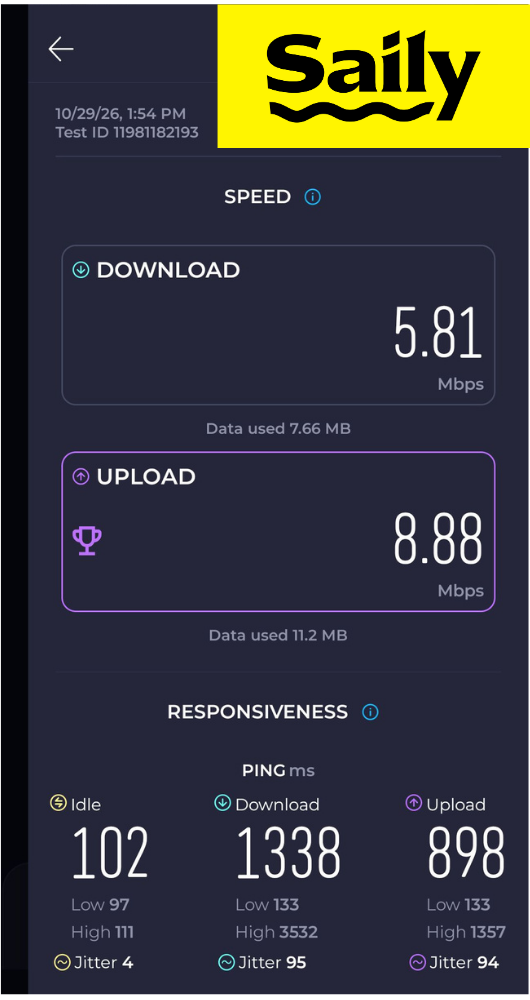
| Saily | 7 | 5.81 Mbps | 5.92 Mbps | 108 ms | 944 / 1,227 ms |
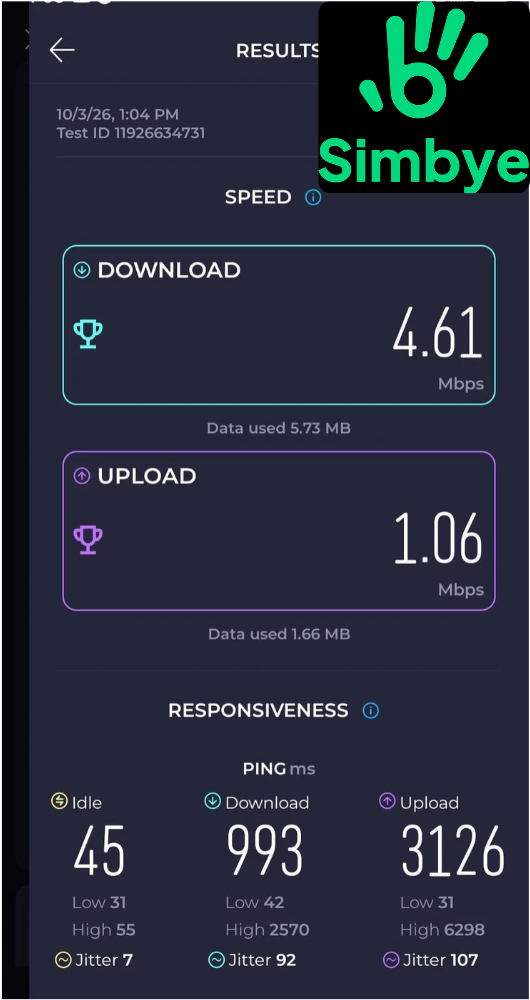
| Simbye | 1 | 4.61 Mbps | 1.06 Mbps | 45 ms | 993 / 3,126 ms |
At home, Saily’s download was about 26% faster than Simbye’s, and its upload was about 5.6 times faster. Saily speeds varied a lot from one test to the next, from about 1 Mbps to nearly 11 Mbps download.
At a Remote Spot
| Line | Runs | Download | Upload | Idle ping | Ping under load (down / up) |
|---|---|---|---|---|---|
| Mint (baseline) | 1 | 10.3 Mbps | 3.37 Mbps | 30 ms | 1,702 / 3,970 ms |
| Saily | 4 | 2.86 Mbps | 3.06 Mbps | ~443 ms | ~1,700 / ~3,990 ms |
| Simbye | 1 | 0.62 Mbps | 0.24 Mbps | 80 ms | 8,301 / 4,568 ms |
Away from home, Saily’s download was about 4.6 times Simbye’s, and its upload was nearly 13 times faster. At 0.62 Mbps, Simbye was slow enough that browsing would drag and video calls wouldn’t hold up.
Why Saily’s Ping Ran Higher
Ping is the delay before data starts moving, and Saily’s was consistently higher than Simbye’s while the connection sat idle. Saily ran about 2.6 times Simbye’s idle ping at home and about 5.5 times at the remote spot. Speedtest measures ping three ways, idle, during download, and during upload, as the screenshots above show, and together they show how responsive a connection stays once it’s busy.
Every Saily test listed Webbing, Saily’s roaming partner, as the provider, while Simbye’s US plan runs on AT&T directly. Routing data through a partner network adds an extra stop along the way, which is the likely reason Saily’s idle ping ran higher.
The picture changes once data is moving. At the remote spot, Saily’s download ping (about 1.7 seconds) was far lower than Simbye’s (8.3 seconds), so Saily stayed more usable under load. For browsing, maps, and messaging, Saily’s higher idle ping won’t matter much, but expect some lag on long video calls.
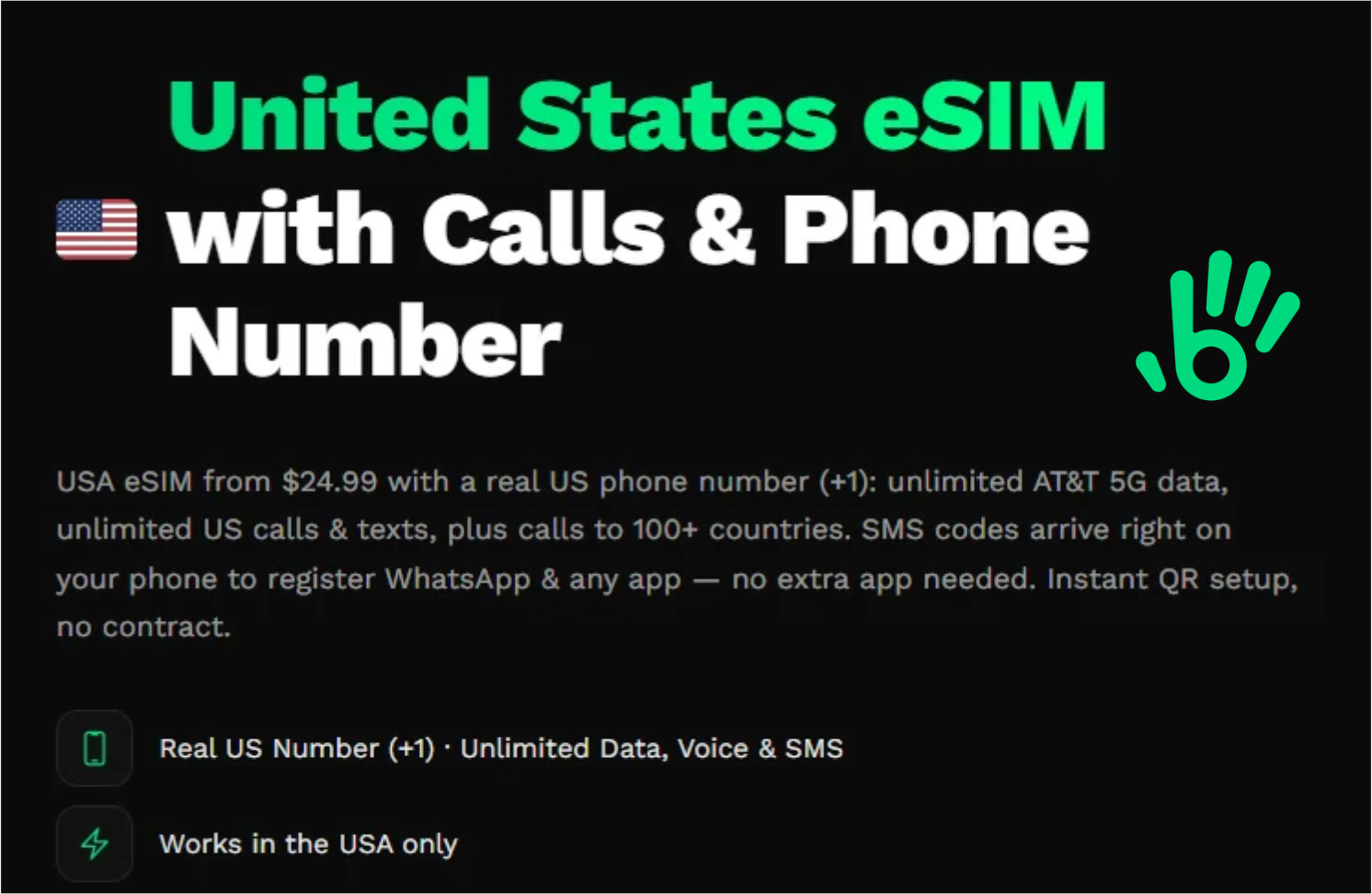
Simbye’s US plan with a phone number, from Simbye’s website (as of October 2026).
Simbye eSIM vs. Saily: Phone Numbers, Calls, and Texts
Simbye’s calling plans include a real local number for calls and texts, while Saily sells a separate US number add-on. That difference decides the choice for many travelers before speed even comes up.
Simbye Includes a Real Local Number
Simbye’s US plan comes with a real +1 number and runs for 10, 20, or 30 days, with 50 GB at high speed before slowing to 512 kbps. Validity starts at purchase, so buy close to your trip, and install it only once, since Simbye warns not to delete it. You can also get a local number in the UK (+44), France (+33), or Thailand (+66), and Simbye has unlimited-calling plans in other countries. I only tested the US plan.
A real number helps with things data apps can’t always handle, like booking confirmations or a host who only texts. Keep in mind that the number goes away when your plan ends.
Saily: Data Plans With an Optional Number
My Saily plan didn’t come with a number, and I didn’t request one, so when I tried to text my sister from it, the message wouldn’t send. Email, browsing, and apps all worked normally, and I confirmed in my phone’s settings that Saily was handling my mobile data.
Saily now sells an optional US number for calls and texts, starting at $0.99 a month billed yearly or $1.99 month to month. The number is US only and requires identity verification in the Saily app after purchase. I haven’t tested it yet. Without it, you can keep your home line active

Security and Privacy Differences
Saily includes extra protection on every plan, while Simbye, like most carriers, doesn’t advertise any security features. The FTC says public Wi-Fi is usually safe today because most websites encrypt your data, but encryption won’t stop you from landing on a scam site. Saily’s web protection is aimed at that gap.
Saily’s Virtual Location, Ad Blocker, and Web Protection
- Virtual location: routes your traffic through one of 115+ locations so you appear to browse from another country. Saily says it encrypts that traffic but isn’t a full VPN replacement. For what a VPN does and doesn’t cover, see What Is a VPN?
- Adult site blocking: blocks adult content for anyone using your eSIM data, which helps if you share your connection with family.
- Ad blocker: Saily says its ad blocker cut data use by 28.6% on average in a test it commissioned from West Coast Labs across 22 popular sites.
- Web protection: blocks known malicious sites and phishing pages and limits trackers.
These features are switched on in the Saily app, so check that they’re on before you travel. For a broader look at staying safe abroad, see Cybersecurity for Digital Nomads.
Keep Your 2FA Off a Travel Number
Don’t move your bank or email two-factor codes to a travel eSIM number. The number can disappear when your plan ends, and text-message codes are already the weakest kind of two-factor authentication, according to CISA.
Do this instead:
- Keep your home line active for codes while your eSIM handles data
- Lock your home number with your carrier before you travel; the FCC has adopted rules requiring carriers to offer free account locks against SIM swaps. Look for “number lock” or “SIM protection” in your carrier’s app or account settings.
- Switch to an authenticator app or passkeys where your accounts allow it (Email and Account Security)
A travel number is fine for short-term codes, like a booking site or a ride app on that trip. If someone does take over your number, our guide to identity theft recovery covers what to do next.
Plans, Pricing, and Refunds
Saily sells small data plans and adds a number separately, while Simbye bundles unlimited data with a number on its US calling plans. Prices vary by destination, so the figures below are starting prices for US plans.

- 1 GB to unlimited plans
- Optional US number from $0.99/mo (billed yearly)
- 200+ destinations
- Ad blocker, web protection, virtual location

- 1 GB to unlimited plans
- Real +1 US number on US calling plans
- 190+ destinations
- No built-in security tools
Saily’s US plans start at $3.99 for 1 GB, and Simbye’s data-only US plans start at $2.99 for the same 1 GB. If you need a number, Saily adds one from $0.99 a month billed yearly, while Simbye’s unlimited plans with a number run $24.99 for 10 days, $34.99 for 20 days, and $44.99 for 30 days, with 50 GB at high speed before slowing to 512 kbps. Validity on Simbye’s calling plans starts at purchase, so buy close to your trip, and install it only once, as Simbye warns not to delete it.
Prices and plan terms are in US dollars and were checked on [publish date].
They can change at any time and may vary by region or currency, so check Saily’s and Simbye’s sites for current pricing before you buy.
Refund rules differ too:
- Saily: full refund within 30 days if the eSIM isn’t installed or activated; after activation, only for technical problems or if more than 99% of the data is unused (Saily refund policy)
- Simbye: requests accepted up to 180 days; unused eSIMs get a full refund within 30 days, and technical or network failures can be refunded after activation (Simbye refund policy)
If your travel dates might change, wait to install Saily until you’re sure you’re going, since its full refund only applies before installation. Simbye’s longer window gives you more room if something goes wrong after setup.
Setup and Install Experience
Saily installed smoothly from its app, while Simbye’s one-tap Android install failed and needed a manual workaround. Both worked once set up.
When I installed Simbye in September 2026, the one-tap install link opened a white screen and stalled. Simbye’s team walked me through manual entry, using the SM-DP+ address and activation code from the setup email, and that worked right away. If you’re on Android and the link stalls, go straight to manual entry. They also have a QR code options, which also works.
Saily’s setup took a few taps. Android asked whether to let the Saily app manage the eSIM, which is how it installs the profile, and I turned on data roaming for the Saily line so it could connect. Everything after that was easy to use.
Which eSIM Should Digital Nomads Choose?
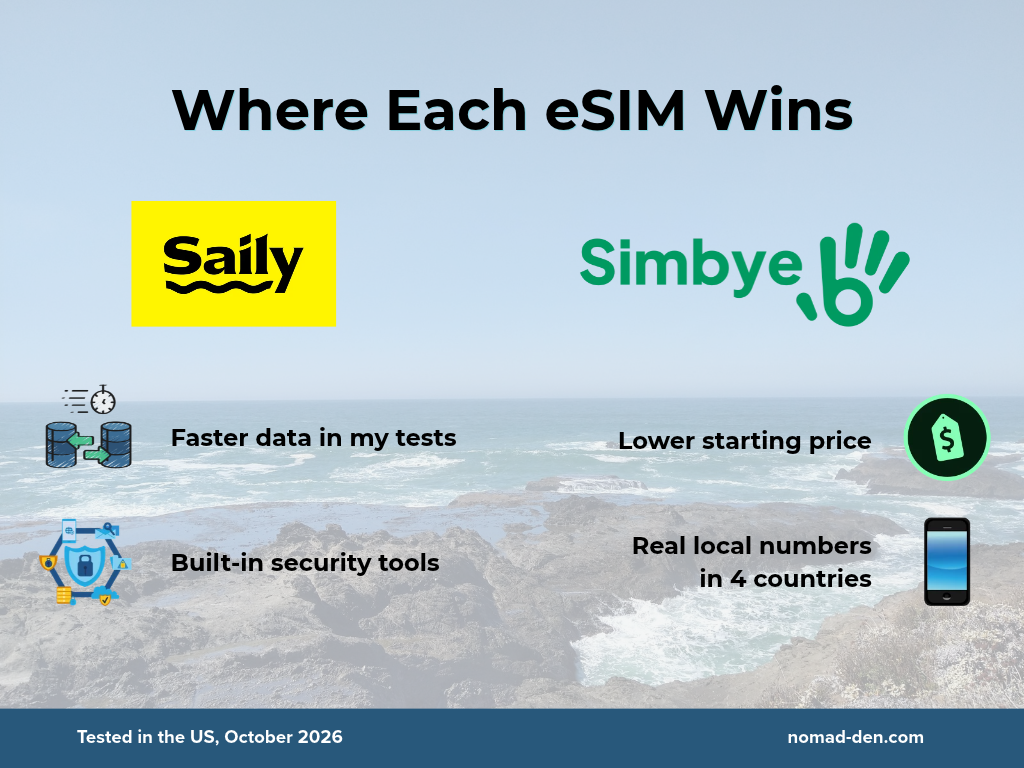
Choose Saily if you mainly need fast, flexible data and more security on the road; choose Simbye if you need a real local number for calls and texts, in the US or abroad. Either way, keep your home line active for important codes.
- Saily fits travelers who upload photos or files, move between countries, and want built-in protection on unfamiliar networks.
- Simbye fits travelers who need a local number for calls and texts, in the US or in countries like the UK, France, and Thailand.
- Test your connection first if your work runs on long video calls, since both eSIMs struggled in weak-signal areas in my tests.
Saily was faster on data in my tests, and Simbye offers real local numbers in more countries. I haven’t tested Saily’s number add-on yet, so calls and texts will get their own comparison in a future post. If you can, run a quick speed test of your own on the first day of your trip, since coverage changes from one place to the next.
FAQs
Faster Data or a Real Number
For most digital nomads, Saily is the stronger choice for data, while Simbye is the better fit when you need a working US phone number. In my tests, Saily was faster at both locations and stayed more usable under load, though its idle latency ran higher. Simbye’s real number made calls and texts simple, but its speeds dropped sharply away from home.
Whichever you choose, keep your home line active for important codes and lock it against SIM swaps before you travel.
Compare Saily plans for your destination.
See Simbye’s US plans with a phone number.
Related Posts
Digital Nomad Visas in 2026: Requirements, Costs, and How to Apply Safely
A digital nomad visa is a temporary residency permit that lets you legally live in…

What Is a VPN? How It Works, What It Protects, and What It Doesn’t
A VPN, or virtual private network, is a service that encrypts your internet connection and…
Cybersecurity for Digital Nomads: The Risks Your VPN Won’t Cover
More than 40 million people are now working as digital nomads worldwide. Despite that scale,…

What is Content Creation? A Beginner’s Guide
Content creation is the act of producing valuable material within a chosen niche, whether that’s…

Best VPN for Beginners: Why You Need One and Where to Start
Cybercrime is rising, with estimates suggesting it costs the global economy $10.5 trillion annually, a…
Saily eSIM Review (2026): My Speed Tests, Features, and Limits
Saily’s affiliate team provided the free data code I used for testing. The results and…