
Some links in this post may be affiliate links. I may earn a commission at no extra cost to you.
Table of Contents
- Why Chrome and Google Aren’t Private, Even in Incognito
- Why This Matters When You Work Online
- Privacy and Security Are Not the Same Thing
- Private Browsers to Consider
- Private Search Engines and Where Their Results Come From
- Is Google Still Better? Mostly, and Here’s Why
- A Word on AI Browsers
- How to Switch Without Disrupting Your Workflow
- FAQs
- Start With One Switch
- Related Posts
Google Chrome accounts for roughly 69% of the world’s web page views, and Google handles about 91% of search referrals. Both figures come from StatCounter’s August 2026 browser data and search engine data. Brave, a browser built around blocking trackers, passed 126 million monthly users in August 2026.
Many people who switch start with one assumption: that Incognito mode was keeping them private. It wasn’t. Google agreed to delete billions of browsing records to settle a lawsuit claiming it tracked people who thought they were browsing privately.
I’ve used Brave as a secondary browser for more than two years now. When your income runs through a browser, including client portals, affiliate dashboards, banking, and email, the choice of browser affects more than your privacy.
Why Chrome and Google Aren’t Private, Even in Incognito
Incognito mode hides your activity from other people using your device, but not from Google or the websites you visit. It doesn’t save your local history and cookies after each session ends. Websites, and the ad companies running on them, can still see your IP address and what you do while you’re there.
Clearing your cookies doesn’t reset tracking anymore either. Since February 2025, Google has allowed advertisers using its ad tools to fingerprint your device, which means identifying you from details like your screen size, fonts, and software. The UK’s data regulator called the change “irresponsible” and noted that, unlike cookies, a fingerprint can’t easily be wiped.
The cookies themselves aren’t going away in Chrome either. Google dropped its plan to block third-party cookies, the small tracking files that follow you from site to site, and shut the project down in October 2025 after six years of promises. Safari and Firefox already block these cookies by default. Chrome still does not.
In 2025, Chrome also changed how extensions work, which disabled the strongest ad blockers, including uBlock Origin. The change affects Edge and most other browsers built on Chrome’s engine. For a broader look at reducing your reliance on Google, see Why DeGoogling Actually Matters in 2026 and our privacy-first alternatives page.
Why This Matters When You Work Online
If you run a business online, nearly every account that pays you is accessed through your browser, so what happens there affects your income directly.
Sponsored Search Results Are a Malware Channel
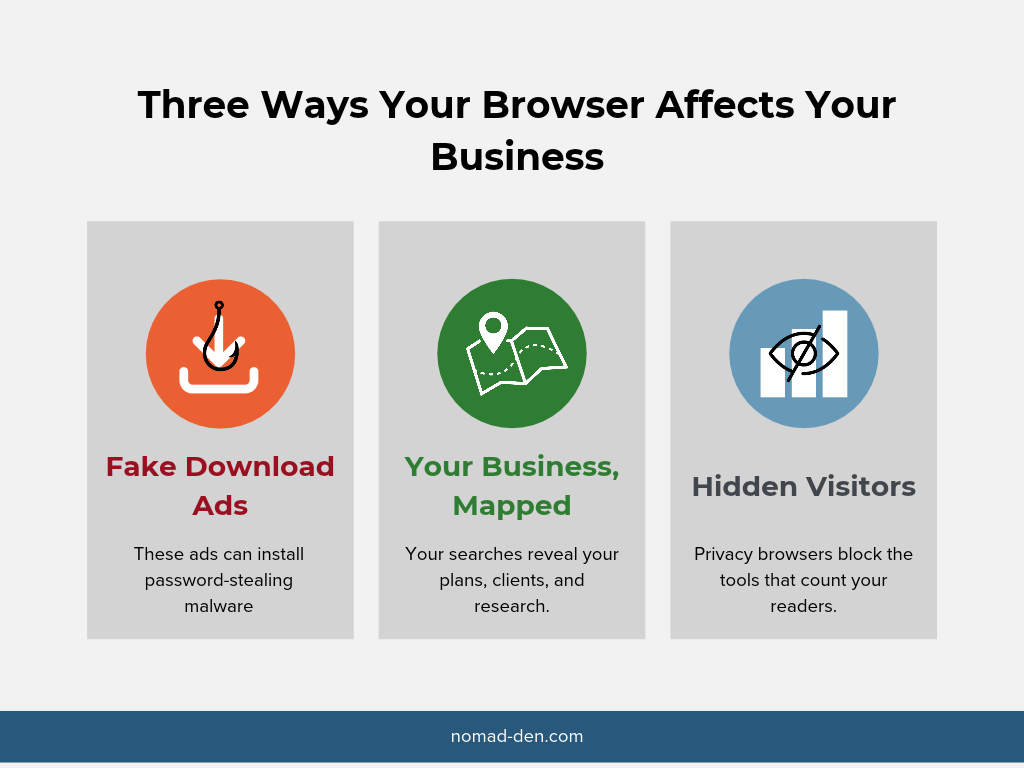
Criminals buy search ads that impersonate popular software, and the fake download installs malware that steals your passwords and logins. This is called malvertising, and it goes after exactly the people who install new tools every week: freelancers, creators, and solo business owners.
In early 2026, Bitdefender found more than 200 malicious Google ads impersonating Mac software, including fake 7-Zip, Notepad++, and LibreOffice downloads. Many ran through hijacked advertiser accounts that once promoted ordinary businesses.
The same trick now targets people searching for AI tools. For example, attackers built cloned install pages for Anthropic’s Claude Code and pushed them through search ads to spread information-stealing malware on Windows and Mac. Another campaign in April 2026 put a fake Homebrew page at the top of Google’s sponsored results.
A browser that blocks third-party ads by default removes that sponsored-result trap before you ever see it. If you stay on Chrome, the safest habit is to scroll past sponsored results for anything you plan to download. Better yet, go straight to the vendor’s official site. For more on how these traps work, see Remote Work Scams: What You Need to Know Before You Apply.
Your Search History Is a Map of Your Business
Think about what you search for in a normal work week. Product ideas you haven’t launched, client names, competitor research, tax questions, contract terms. Together, that history is a map of your business.
Search and browsing data feed advertising profiles, and those profiles overlap with the data broker market. That’s where scammers pull the details that make phishing messages sound believable. We cover how to shrink that exposure in How to Remove Your Personal Data from the Internet. A data removal service like Incogni handles the broker side automatically.

Your Readers Use These Browsers Too
On the other side of this, the same tracking that follows you around is what makes online advertising work. Google and Meta collect data across their own platforms and the many websites that use their tools, which lets them show ads to the people most likely to buy. More targeted ads perform better, so advertisers pay more for them. Many online businesses, including this one, also depend on tracking to know which links and campaigns actually earn money. When you run a business online, you’re on both sides of ad targeting. That’s why it’s useful to understand what privacy browsers change for site owners, not just for users.
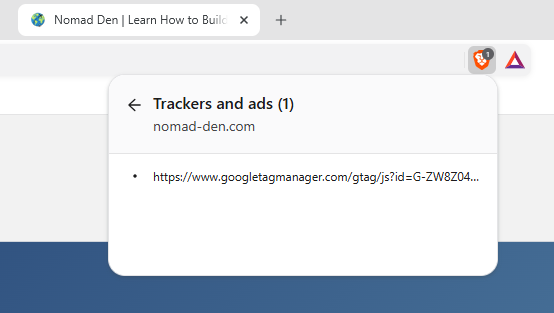
Brave’s Shields feature blocks trackers and cross-site cookies by default, and you can see exactly what was blocked by clicking the Shields icon in the address bar. Google Analytics is on the filter lists Brave uses, so its tracking script never loads for Brave users.
When I loaded nomad-den.com in Brave, Shields blocked exactly one item: Google Tag Manager, which is how Google Analytics loads on my site. That means Google Analytics never records Brave visitors at all. Matomo, the privacy-focused analytics tool I also use, wasn’t blocked, so it still counts them.

Matomo logs each visitor’s partially masked IP address and approximate location. I’ve removed mine from this screenshot for privacy.
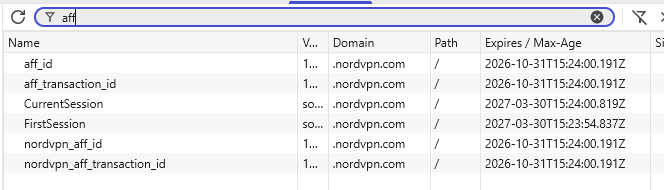
Affiliate links can be affected too. Brave’s debouncing feature recognizes known tracking redirects and sends you straight to the destination. Brave says this covers bounce-tracking links in places like affiliate marketing emails (Brave). To test this, I clicked a NordVPN banner on one of my own posts using Brave. The link worked, and my affiliate ID carried through to NordVPN’s site. Brave did block two trackers there, but they were NordVPN’s own Google Analytics scripts, not anything tied to my referral.
In the browser’s developer tools, NordVPN’s affiliate cookies were all set to expire in 30 days, the full referral window. Brave limits some cookies to 7 days, but it didn’t shorten these. The click also showed up in my NordVPN affiliate dashboard.
Banners were a different story. The same Incogni banners that display in Chrome don’t appear at all in Brave. Brave’s filter lists block the ad network that serves them, so Brave users never see them. Even a banner hosted on my own site didn’t display in Brave, while a larger version of the same banner did. My text links to the same offer worked fine. If a meaningful share of your audience uses privacy browsers, text links inside your content will reach readers that banners can’t.
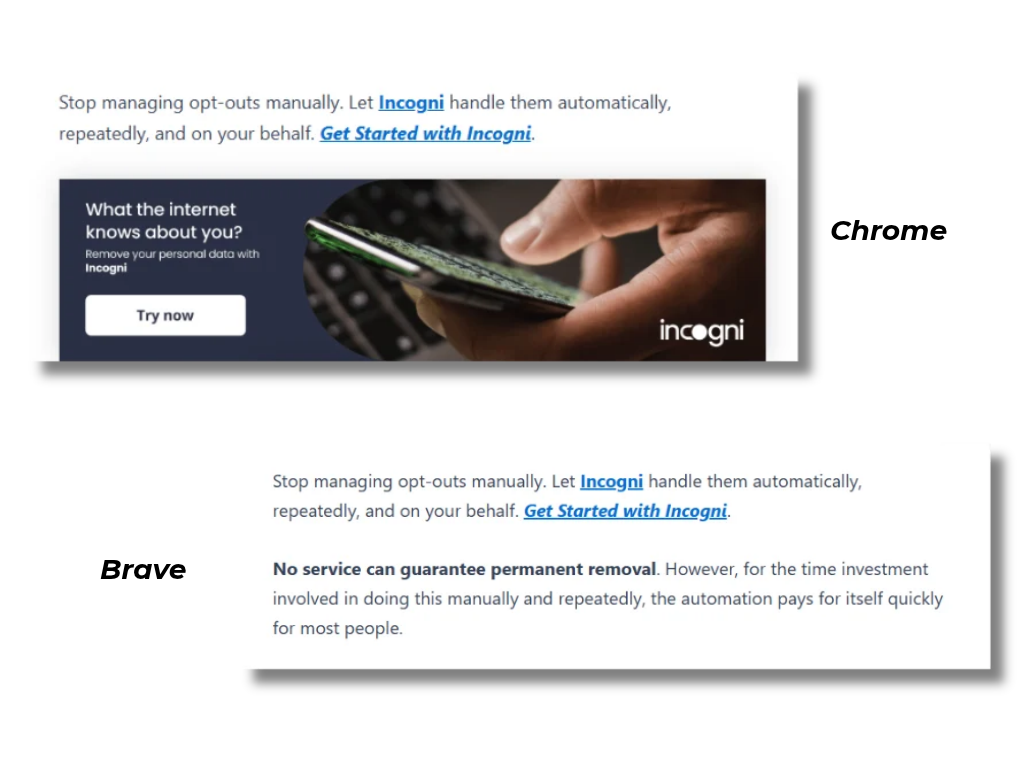
To confirm, I clicked an Incogni text link through CJ in Brave, and the click registered in my CJ dashboard. Brave didn’t skip the affiliate redirect. The takeaway for site owners is simple. Your traffic and affiliate numbers likely undercount your most privacy-conscious visitors, so read your analytics as a floor, not an exact count.
Privacy and Security Are Not the Same Thing
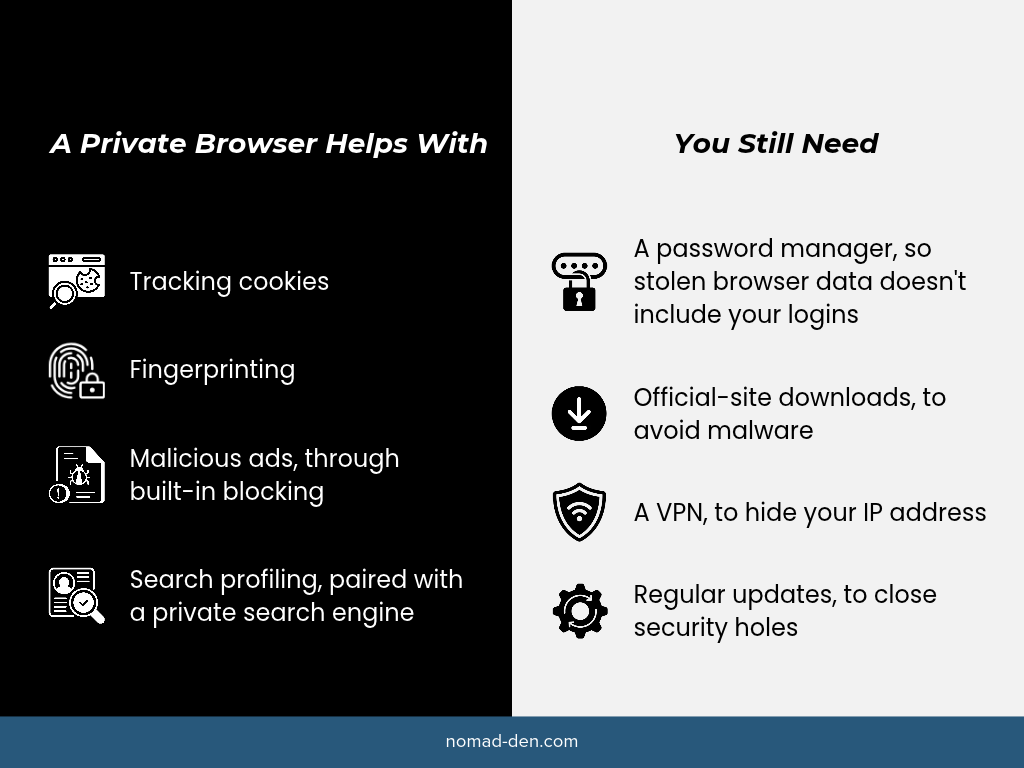
A private browser reduces how much data is collected about you, but it can’t protect you from malware that’s already on your device. Chrome is strong on security. It updates often, isolates websites from each other, and warns you about known dangerous sites. Where it falls short is privacy. Some privacy browsers are the reverse: excellent at blocking tracking, but no better than Chrome once something malicious is installed.
Information-stealing malware, known as infostealers, doesn’t care which browser you use. It pulls saved passwords and login sessions from whatever browser is on the machine. Security firm Flashpoint warns that stolen browser cookies can let attackers take over logged-in sessions and potentially bypass two-factor authentication. That’s why three habits matter as much as the browser you choose:
- Store passwords in a dedicated password manager, not the browser
- Download software only from the developer’s official site
- Keep your browser and operating system updated
A password manager like NordPass keeps your credentials out of browser storage, which is the first place infostealers look. For a side-by-side comparison, see Best Password Managers & Why You Need One.

Private Browsers to Consider
No browser is perfect. The right one depends on how much convenience you’re willing to trade. For independent, regularly updated test results, PrivacyTests.org runs the same privacy checks against every major browser.
| Browser | Engine | Blocks Trackers by Default? | Fingerprinting Defense | Best For |
|---|---|---|---|---|
| Brave | Chromium | Yes | Randomizes fingerprint data | Chrome users who want an easy switch |
| DuckDuckGo | System engine (varies by device) | Yes | Blocks known fingerprinting methods | Simple privacy with few settings to manage |
| Firefox | Gecko | Yes (known trackers) | Blocks known fingerprinters | Users who want full ad-blocker support |
| LibreWolf | Gecko | Yes | Stronger than Firefox defaults | Firefox users who want stronger privacy defaults |
| Mullvad | Gecko | Yes | Makes users look identical | Maximum privacy without Tor’s speed cost |
| Tor | Gecko | Yes | Makes users look identical | Anonymity when it truly matters |
Chromium is Google’s engine and powers Chrome, Edge, Brave, and Opera, so those browsers are affected by Google’s decisions, like its limits on ad-blocking extensions. Brave’s built-in Shields aren’t affected, since they’re part of the browser rather than an extension.
Gecko is Mozilla’s engine and powers Firefox and its privacy-focused forks.
Browsers also fight fingerprinting in two different ways: Brave randomizes the details it shares so your fingerprint keeps changing, while Tor and Mullvad browsers make every user share the same details, so you blend into a crowd of identical-looking visitors.
Brave
- Built on Chromium, so most Chrome extensions work
- Shields block ads, trackers, cross-site cookies, and fingerprinting by default
- Brave Search set as the default search engine
- Brave Origin, a paid version without the crypto and rewards features
I’ve used Brave for more than two years, though never as my main browser. For most of that time, I used it mainly for ChatGPT. These days I use it mostly on my phone, as an alternative to Chrome.
Brave has one mark on its record that affiliate marketers should know about. In 2020, users discovered the browser was autocompleting certain crypto exchange addresses with Brave’s own affiliate code. CEO Brendan Eich called it a mistake and removed the feature. A browser inserting its own referral code is a close cousin of cookie stuffing, and it’s a reminder that no company deserves blind trust.
DuckDuckGo
- Blocks third-party trackers by default
- Fire Button clears tabs and browsing data in one tap
- Built-in email protection that strips trackers from emails
- DuckDuckGo Search set as the default
DuckDuckGo’s browser is the easiest privacy upgrade for people who don’t want to adjust settings. It works out of the box, with very little to configure. It had a trust setback of its own in 2022, when a security researcher found its mobile browser allowed some Microsoft trackers to load on other websites because of a search partnership with Microsoft.
Firefox and LibreWolf
- Open-source browser from the nonprofit-owned Mozilla
- Enhanced Tracking Protection on by default
- Still supports the full version of uBlock Origin
- LibreWolf is a Firefox fork with telemetry removed and stricter privacy settings out of the box
Firefox remains the strongest mainstream option for people who want full control over ad blocking. It also had a trust setback of its own. In 2025, Mozilla introduced new Terms of Use and dropped its blanket promise that it would never sell user data. The company said the legal definition of “selling data” had become too broad in some places to make that promise LibreWolf avoids most of that debate by removing Mozilla’s data collection entirely.
Mullvad Browser and Tor Browser
- Mullvad Browser: built with the Tor Project, designed to be paired with a VPN
- Tor Browser: routes traffic through the Tor network to hide your location
- Both work by making every user look the same to websites
These are specialist tools, not daily drivers for most online businesses. Tor’s routing makes browsing noticeably slower. Many sites, including banks and payment processors, treat Tor traffic as suspicious. Mullvad Browser keeps most of the anti-fingerprinting protection without the speed penalty, which makes it a reasonable choice for sensitive research.
Private Search Engines and Where Their Results Come From
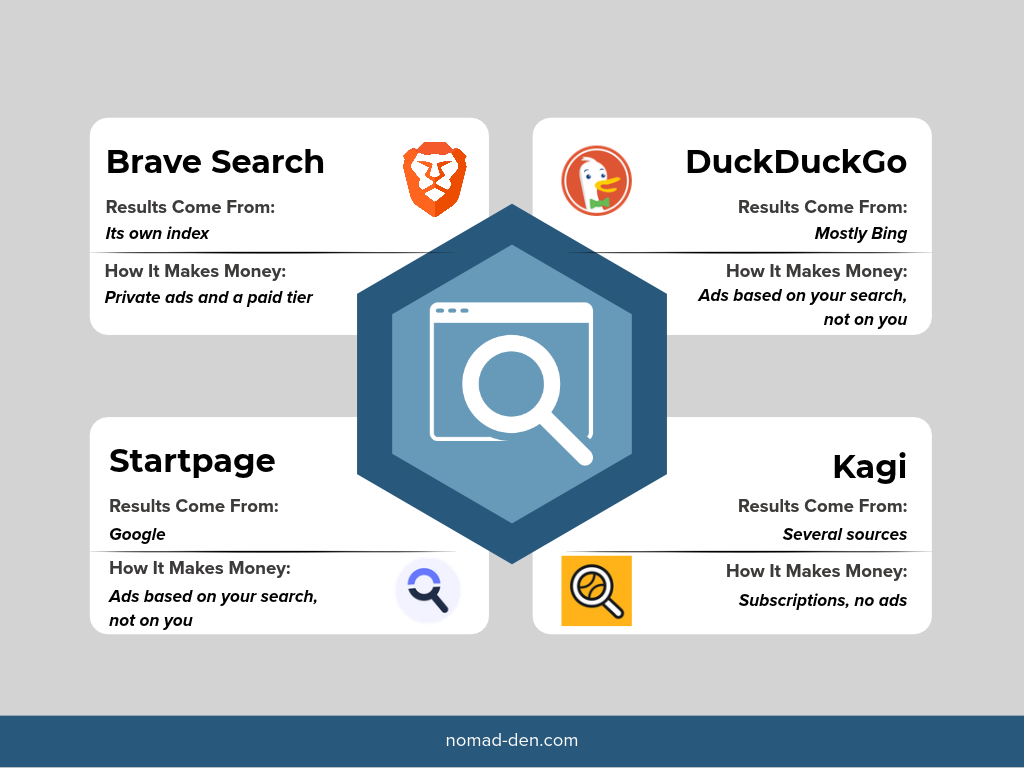
Most “private” search engines don’t have their own index of the web; they license results from Google or Bing and remove out the tracking. A private browser controls what websites can collect while you browse, while a private search engine controls what’s collected about what you search, and you can use either one without the other. Knowing where results come from explains why quality varies so much between them.
Brave Search
- Runs on its own independent index of the web
- Doesn’t build a profile from your searches
- Available in any browser, not just Brave
Brave Search is one of the few engines that actually crawls the web itself. Brave describes it as one of only three independent search indexes in the western world, and the only one outside Big Tech. About 8% of its searches come from people using other browsers, most notably Chrome.
DuckDuckGo
- Doesn’t store search history or build user profiles
- Most standard results come from Bing
- “Bang” shortcuts let you send a search to another engine
DuckDuckGo is private, but it isn’t independent. Its own help pages state that most traditional links and images in its results come from Bing.
Startpage
- Shows Google’s results without Google seeing who searched
- Removes identifiers and IP data before passing queries along
- Optional “Anonymous View” for visiting results through a proxy
Startpage is the closest you’ll get to Google results without the Google profile. It’s worth knowing that Startpage has been part of System1, an advertising technology company, since 2018. Startpage says contracts keep its privacy decisions in the hands of its own team in the Netherlands, where it’s subject to EU privacy law.
Kagi
- Paid subscription with no ads
- Lets you block or boost specific websites in your results
- Combines results from several sources
Kagi’s model is simple: you pay with money instead of data. For most people who search for work, the $10 Professional plan with unlimited searches is the realistic choice. A $5 Starter plan covers 300 searches a month for lighter use. A free trial includes 100 searches, and Kagi doesn’t charge you for months you don’t use it.
Is Google Still Better? Mostly, and Here’s Why
Google’s results are usually better because of the same data collection that makes it a privacy problem. In my experience, and in the experience of most people who switch, some searches simply come back better on Google.
The US antitrust case against Google showed why: testimony revealed that Google’s ranking systems learn from users’ click behavior. It also showed that 13 months of Google’s user data was equivalent to more than 17 years of the data available to Bing, its closest competitor. Add in Gmail, YouTube, Maps, and other Google apps, and Google sees more of how people use the web than anyone else.
However, Google’s advantage may shrink. In September 2025, a federal judge ordered Google to share search data with qualified competitors. Both Google and the government have appealed the ruling, so the final outcome is still open. I ran five work-related searches on each engine on the same day, signed out of Google.
For each query, I recorded Google’s top results, then checked where those same results ranked on Brave Search and DuckDuckGo.
| Search Query | Brave Search | DuckDuckGo | |
|---|---|---|---|
| download OBS Studio | Download page 1st, AI overviews after. No sponsored results | Download page 1st, Microsoft 2nd. No AI summary or sponsored results | Download page 2nd, No AI summary or sponsored results |
| how to set up DMARC record | AI overview 1st, Microsoft Learn 2nd, Google Workspace 3rd | AI summary 1st, Google Workspace 2nd, Microsoft Learn 3rd | EasyDMARC 1st, AI summary 4th, Microsoft Learn 7th |
| NordPass vs Bitwarden | AI overview 1st, Reddit 2nd, passwordmanager.com 3rd | AI summary 1st, Reddit 3rd, passwordmanager.com 4th | Bitwarden 1st, AI summary 2nd, passwordmanager.com 7th |
| Google antitrust appeal | AI overview 1st, Reuters 2nd, The New York Times 3rd | AI summary 1st, NYTimes 2nd, Reuters 3rd | AI summary 1st, smashologymedia.com 2nd, Reuters 10th |
| tax accountant for freelancers near me | 3 sponsored results 1st, AI overview 2nd, Google Maps 3rd | AI summary 1st, Upwork 2nd, OpenStreetMap 4th | Apple Maps 1st, 1-800Accountant 2nd, Ramsey Solutions 3rd |
The gap was smaller than I expected. Brave Search returned nearly the same top results as Google for most searches. DuckDuckGo differed the most, especially for news, where a major outlet like Reuters ranked 10th. Google was the only engine to show sponsored results, and only for the local search, where buying intent is highest. Google’s edge showed up mainly in local and recent results, which are the areas where its data advantage matters most.
You don’t have to choose all or nothing. Set a private engine as your default. When a search needs Google, use Startpage or type !g before your query in DuckDuckGo to send it to Google directly. You keep most of your searches private and still get Google’s results when they matter. If you research keywords for your own site, see Keyword Research for Beginners for how personalized results can skew what you see.
A Word on AI Browsers
AI browsers that act on your behalf also act inside your logged-in accounts, and that’s where the risk lives. These tools can read pages, fill out forms, and click through tasks for you. Hidden instructions on a webpage can trick them into doing something you never asked for. This is called prompt injection.
In December 2025, research firm Gartner advised organizations to block AI browsers for now, warning that their default settings favor convenience over security. Brave’s own researchers concluded that prompt injection is a problem across the whole category of AI browsers, not just one product. The category is also shifting fast. OpenAI discontinued its ChatGPT Atlas browser in August 2026 and moved its browsing features into the ChatGPT app and a Chrome extension. Until the risks are better understood, keep banking, affiliate dashboards, and client accounts out of any AI agent’s reach.
How to Switch Without Disrupting Your Workflow
Switching to a private browser takes about 10 minutes, and you don’t have to give up Chrome completely. Most browsers import your bookmarks, history, and settings during setup.
- Import and set a default. Bring over your bookmarks, then make the new browser your default so links open in it.
- Separate your financial accounts. Use a dedicated browser or profile, with no extensions, for banking, payment processors, and affiliate dashboards. A malicious extension can’t reach accounts it never sees.
- Change your default search engine. Do this even if you keep your current browser. It’s the single easiest privacy upgrade.
- Keep Chrome for what requires it. If a tool or client portal only works properly in Chrome, use it there and nowhere else.
- Add a VPN for what browsers can’t hide. A private browser doesn’t hide your IP address from websites or your internet provider. A VPN like NordVPN covers that, and its Threat Protection Pro feature blocks malicious sites across every browser you use. For the details, see What Is a VPN? and Best VPN for Beginners.
You don’t have to make every change at once. My own setup is a mix: Chrome is still my main browser, and I use Brave alongside it, mostly on my phone. Even one change, like a separate profile for your financial accounts, limits how much any single browser knows about you and your business.
FAQs
Start With One Switch
You don’t need to rebuild your whole setup this week. Change your default search engine today; it takes 30 seconds and covers most of your searches. Then try a private browser for your everyday browsing, and keep a separate, extension-free profile for the accounts that pay you. A private browser limits how much data companies collect about you, while a password manager and careful download habits protect the accounts you’ve already built. You need both to keep an online income safe.
Learn how to protect yourself from identity theft.
Some links in this post may be affiliate links. I may earn a commission at no extra cost to you. Learn more here.
Related Posts
When to Start Outsourcing: How to Vet Your First Virtual Assistant (or Freelancer)
Outsourcing makes sense the moment a task is both teachable and consistently the thing standing…

17 Cybersecurity Terms Every Online Business Should Know (Part 2)
Cybersecurity terms for online business owners cover the threats, compliance requirements, and protective habits that…

Affiliate Marketing Scams: How to Spot Them (and Protect Your Own)
Affiliate marketing is a legitimate, commission-based business model, not a scam, that predates the internet…
Digital Nomad Visas in 2026: Requirements, Costs, and How to Apply Safely
A digital nomad visa is a temporary residency permit that lets you legally live in…
Is NordVPN Actually Worth It? Ownership, Audits, and Pricing Explained
NordVPN is the VPN provider most affiliate marketers default to recommending, but the research behind…
What Is a VPN? How It Works, What It Protects, and What It Doesn’t
A VPN, or virtual private network, is a service that encrypts your internet connection and…