Some links in this post may be affiliate links. I may earn a commission at no extra cost to you.
Table of Contents
- How a Fake-Client Scam Unfolds
- The Upfront-Fee Scam: Paying to Get Paid
- The Overpayment Scam (and My Fake-Check Story)
- Scams That Want Your Identity or Your Device, Not Your Money
- Fiverr and Upwork Scams: What the Platforms Protect
- Red Flag vs. Safe Alternative Checklist
- Real Client or Fake Client? Why It Changes Your Options
- If You Already Sent Money or Deposited the Check
- FAQs
- Verify First, Then Say Yes
- Related Posts
A fake-client scam is when someone poses as a paying client to take your money, your personal information, or control of your computer. In most cases, the scammer either asks you to pay before any work starts or sends you more money than you’re owed. This specific type of scam is growing fast. Employment fraud complaints to the FBI reached 24,688 in 2025, with $362.9 million in reported losses, up from $70.2 million just two years earlier, according to the FBI’s 2025 Internet Crime Report.
I’ve been on the receiving end of a fake check myself, while selling a couch on Craigslist. My bank held me responsible, even though I was the one who’d been scammed. I’ll share the full story below, because the same trick now targets freelancers.
This playbook walks through how each type of fake-client scam works. Every red flag comes paired with what to do instead, so you can keep saying yes to new clients without getting burned.
How a Fake-Client Scam Unfolds
Almost every fake-client scam starts the same way, whatever the scammer is really after. An offer that appears to be “too good to be true” arrives, then the “client” tries to move the conversation somewhere off the platform. Spotting either one of these signs early stops most scams before they cost you anything. What happens after that depends on the scam, and each type has its own section below.
The Approach
The approach is the first contact, and it usually looks better than a real lead. Common signs include a budget well above market rate, a vague project description, urgency to start today, and a polished profile with little or no hiring history.
AI has made polished profiles easy to fake. Upwork warns that scammers now build client profiles with generated headshots, fabricated work histories, and polished bios. The FBI also linked almost $13 million in 2025 employment-scam losses to AI voice spoofing and possible deepfakes during online interviews.
Do this instead: verify the client before you invest time. On a platform, check for a payment-verified badge, past hires, and reviews from other freelancers. Off-platform, confirm the company has a real website and an email address on that same domain, and run the profile photo through a reverse image search like Google Lens or TinEye.
The Off-Platform Pivot
The pivot is the moment a “client” asks to move the conversation to Telegram, WhatsApp, or personal email before a contract exists. Once you leave the platform, you lose records of the conversation and the payment protection that came with it.
Upwork says plainly that it cannot help recover payments made outside the platform. Fiverr goes further: taking business off-platform violates its Terms of Service and can cost you the account.
Do this instead: keep every message and payment on the platform until a contract is funded. A short reply handles the request without souring a real lead:
“I keep all project messages and payments here so we’re both protected. Happy to keep talking as soon as the contract is set up.”
A real client will agree. A scammer will push back, offer a bonus to switch, or go quiet.
The Upfront-Fee Scam: Paying to Get Paid
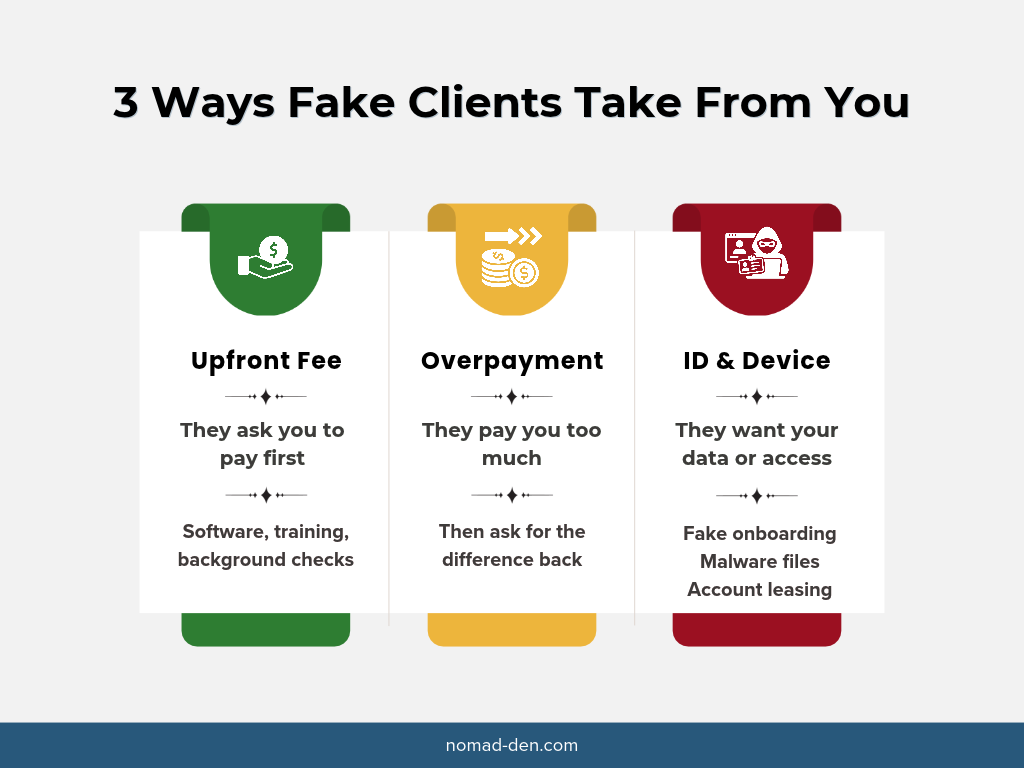
In an upfront-fee scam, the “client” asks you to pay before you can start the work. The fee comes with a reasonable-sounding label, and it’s usually small next to the promised contract, which is what makes it easy to pay. Upwork’s 2026 scam guide lists several current versions:
- A background check you pay for before a contract exists
- An “AI training” job that charges a fee to access the tool or dashboard
- A promised reimbursement: buy $1,000 in supplies, get $1,500 back, starting with a small transfer to “confirm your banking details”
Other labels include software licenses, training courses, onboarding kits, and “verification deposits.” The FBI tracks this pattern as advance fee fraud, which drew 7,762 complaints and $155.9 million in reported losses in 2025.
Do this instead: in a real freelance deal, the only money that moves before work starts moves toward you. Ask for a deposit or a funded milestone before you begin. If the project needs specific software, the client should give you access through their own account or license. A real client won’t object, and a fake one will stall or disappear.
The Overpayment Scam (and My Fake-Check Story)
An overpayment scam sends you more than you’re owed and asks you to return the difference before the payment turns out to be fake. It usually arrives as a check, but it can come through any payment that can be reversed later.
Here’s every detail I can still recall, since this happened more than five years ago:
I was selling a couch on Craigslist. The buyer sent a check, and I deposited it at a major national bank. Something felt off, and I told the bank I wasn’t sure it was real. But I’m not a check fraud specialist or a bank teller, and neither are most people. To me, the check looked legitimate.
The bank never cleared it, but once it came back fake, they held me responsible anyway. Nobody heard me out or showed me what I should have spotted. They treated me as the perpetrator, not the victim. I refused to pay, and I never did, which is part of why I no longer bank with them.
Public marketplaces like Craigslist and Facebook Marketplace are a favorite target for this scam, but they’re far from the only ones. It works the same whether you’re selling a couch or a logo design. Swap the buyer for a “client” and the couch for a project, and nothing else changes.
The key to this scam is timing. Banks often make deposited funds available within a day or two, but it can take weeks to learn a check was bad, and by then you’re the one who repays the bank, per the FTC’s guidance on fake check scams. Banks can also hold large or unusual checks longer. That’s why fraudsters push for a quick refund, often with a line like, “Don’t worry, the check will clear. We just need the difference back.” See the urgency? They know it won’t clear.
Forwarding the difference can also pull you into a crime. When you send part of a payment on, you may be moving stolen funds for someone else, which makes you an unknowing money mule.
Do this instead: don’t accept checks from new online clients. Get paid through the platform, or through an invoice or payment link you control. If a client “accidentally” overpays, never refund it from your own money; let the platform or payment processor reverse the original charge.
Scams That Want Your Identity or Your Device, Not Your Money
Some fake clients never ask you to pay anything. They’re after your personal details, your logins, or access to your computer, which can be resold or used for much larger fraud later.
Fake Onboarding
Fake onboarding copies a real hiring process to collect your Social Security number, ID, or bank details. Scammers run a short interview, extend an offer quickly, then ask for sensitive documents to commit fraud or open accounts in your name. On Upwork, no client ever needs that information, because the platform collects it to verify your identity and pay you. Off-platform, the FTC’s rule of thumb applies: a company that asks for your Social Security number before hiring you is running a scam.
Do this instead: share tax details only after you’ve verified the client and signed a contract, and only on the official W-9 form through a secure channel, never in a chat message. If you’ve already shared them, follow the recovery steps below.
Identity monitoring can catch misuse of your details before it snowballs. Protect your identity with Coveron.
Malware Hidden in “Project Files”
Some fake clients send a test task or project file that installs malware the moment you open or run it. On September 18, 2026, agencies in Japan, the United States, Australia, and Germany issued a joint advisory on the North Korean group WaterPlum, also known as Contagious Interview.
The advisory says WaterPlum reached software developers and web freelancers through social networks, job platforms, and freelance marketplaces. Between December 2025 and July 2026, the group infected at least 30,000 devices in more than 100 countries and stole about $10.71 million in cryptocurrency. Identity documents stolen in those attacks were later reused by North Korean IT workers to land jobs under other people’s names.
You don’t have to be a developer to be targeted. Documents that ask you to “enable content,” compressed files, and “viewer” downloads all deliver malware the same way.
Do this instead: don’t open or run files until the client is verified and the contract is funded. Preview documents in your browser, for example in Google Drive, instead of downloading them. Developers should run test projects in a separate virtual machine, never on their main computer.
Malware often goes after saved browser logins, so unique passwords and two-factor authentication keep one stolen login from unlocking everything else. Secure your logins with NordPass.

Account Leasing
Account leasing is when someone offers to pay you for access to your freelance profile. Upwork warns that this breaks its Terms of Service, can be illegal, and can leave you responsible for taxes owed or crimes committed through your account.
Do this instead: decline, report the user to the platform, and never share your login with anyone, for any amount.
Fiverr and Upwork Scams: What the Platforms Protect
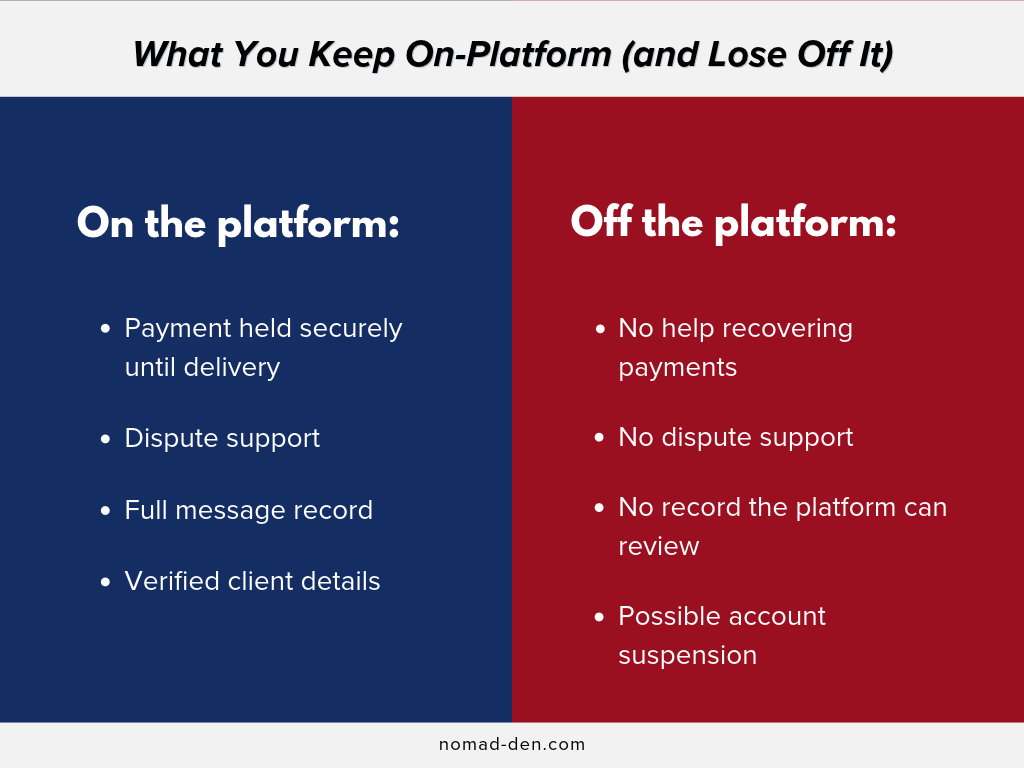
Fiverr and Upwork both protect freelancers with secure payments and dispute support, but only while the work and the money stay on the platform. Most scams on either site start by trying to get you off it.
Fiverr
Fiverr processes every order’s payment through its own system and can step in when a dispute comes up. Its off-platform policy says users who take deals elsewhere lose those protections, and the site even provides ready-made replies for turning down off-platform requests.
Two more things to know. Fiverr’s support team never contacts you through your Fiverr inbox, only through support tickets, so an inbox message claiming to be from Fiverr is a phishing attempt. And any buyer asking for your card details to “verify” your account is running a scam.
Upwork
Upwork protects your pay when the client has a verified payment method and the work is tracked through its system. Hourly Payment Protection requires the Upwork desktop app, and fixed-price work is protected through funded milestones, per Upwork’s red flags guide.
Real Upwork staff email from @upwork.com or @cloud.upwork.com addresses and never ask for your password. Upwork reports that job offers from bad-actor clients dropped more than 90% year over year in its 2025 Transparency Report. That’s the platform’s own figure, and it only covers what happens on Upwork.
Do this instead: before you send a proposal, look for the payment-verified badge and some money already spent by the client. Report anything suspicious with the report option on the job post, profile, or message.
Red Flag vs. Safe Alternative Checklist
Every red flag in a fake-client scam has a safe alternative that a real client will accept without pushback. Use this table as a quick check before you accept any new project.
| Red flag | Do this instead |
|---|---|
| Budget far above market rate for a vague task | Ask for a detailed scope before you quote |
| Client profile with no hires, reviews, or verified payment | Wait for verification, or move on |
| Request to switch to Telegram or WhatsApp before a contract | Keep all messages on the platform until the contract is funded |
| A fee for software, training, or a background check | Ask the client to provide access through their own account |
| A check for more than your quote | Get paid only through the platform or a payment link you control |
| “Please send back the difference” | Let the platform or processor reverse the original payment |
| A request for your SSN or ID before a contract | Share tax details only on a W-9, after a signed contract |
| A “test project” file to download and run | Preview in the browser, or use a separate virtual machine |
| An offer to pay for access to your account | Decline and report the user |
Real Client or Fake Client? Why It Changes Your Options
A real client who won’t pay can be pursued, but a fake client usually can’t, because there’s no real name or address behind the profile. That’s why verifying the client comes before any contract.
Some states now give freelancers real leverage against clients who don’t pay. California’s Freelance Worker Protection Act, in effect since January 1, 2025, requires a written contract for freelance work of $250 or more. It sets payment by the contract date, or within 30 days of finishing the work if no date is given. A hiring party that refuses to provide a written contract on request owes $1,000 in statutory damages. New York and Illinois have similar laws.
None of that helps against someone who vanishes after the check bounces. Contracts protect you from bad clients; verification protects you from fake ones. If you don’t live in California, look up the freelancer protection laws in your own state or country, since they vary widely. This isn’t legal advice, but a written contract is a smart habit anywhere, and these freelance business tools for contracts and getting paid make it easier to set one up.
If You Already Sent Money or Deposited the Check
Contact whoever moved the money today, because the sooner you report it, the better your chances of stopping or reversing the payment. The actions you should take first depend on how the money left.
- Check you deposited: call your bank right away, tell them the check may be fake, and don’t spend or forward any of those funds.
- Bank transfer or wire: ask your bank to recall or reverse the transfer.
- Payment app: report it in the app, then call the bank or card linked to it.
- Gift cards: contact the gift card company, tell them you paid a scammer, and ask for a refund.
- Cryptocurrency: contact the exchange or service you used; recovery is rare, but report it anyway.
- Platform payment: report the user through the platform and save every message and file.
The FTC’s guide on what to do if you paid a scammer covers each payment type in more detail. Then report the scam at ReportFraud.ftc.gov and to the FBI at ic3.gov.
If you shared your Social Security number, ID, or bank details, see what to do next. For the wider recovery checklist, see Remote Work Scams: What You Need to Know Before You Apply.
FAQs
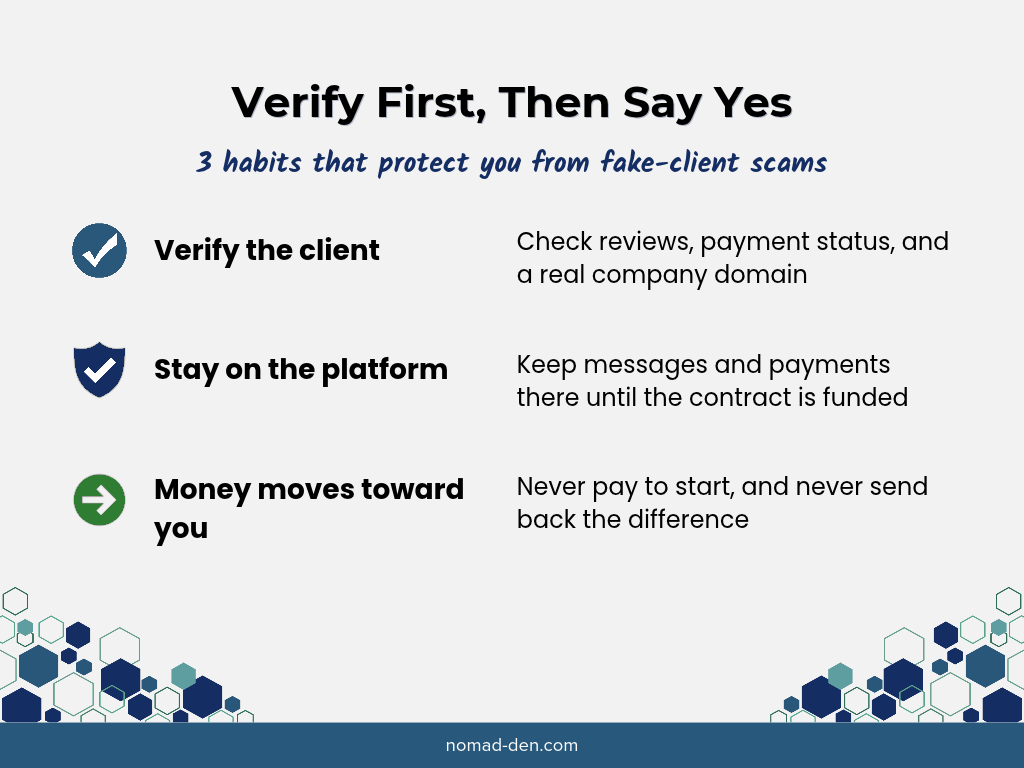
Verify First, Then Say Yes
Fake-client scams change their labels constantly: background check fees, AI training dashboards, test projects that carry malware. The playbook underneath stays the same. Get you off the platform, then get money, information, or access flowing the wrong way.
That’s good news, because one habit beats every version. Verify the client, keep the work and payment on the platform until a contract is funded, and remember that in a real deal, the upfront money moves toward you.
I learned that the hard way with a fake check. You don’t have to. Run the checklist above before you take on your next client, and keep saying yes to the ones who pass.
Protecting what you earn is only half of building a freelance business that lasts. Learn how to build a steady income as a freelancer.
Some links in this post may be affiliate links. I may earn a commission at no extra cost to you. Learn more here.
Related Posts
WordPress PHP Version: How to Check It After PHP2Shell
PHP2Shell is a pair of critical security flaws in PHP, the software every WordPress site…
Best Free Tools for Content Creators (and What They Really Cost)
The best free tools for content creators cover four main jobs: planning what to make,…
Private Browsers and Search Engines Worth Switching To
Google Chrome accounts for roughly 69% of the world’s web page views, and Google handles…
When to Start Outsourcing: How to Vet Your First Virtual Assistant (or Freelancer)
Outsourcing makes sense the moment a task is both teachable and consistently the thing standing…

17 Cybersecurity Terms Every Online Business Should Know (Part 2)
Cybersecurity terms for online business owners cover the threats, compliance requirements, and protective habits that…

Affiliate Marketing Scams: How to Spot Them (and Protect Your Own)
Affiliate marketing is a legitimate, commission-based business model, not a scam, that predates the internet…
On the malware in “project files” point, one practical habit is to open briefs and assets from new clients only inside the platform’s own preview or in a cloud viewer, rather than downloading archives to the laptop where you keep client logins and banking. Be particularly careful with password-protected zip files, as the password is often there to stop email and antivirus scanners from looking inside, and with any “brief” that turns out to be a shortcut (.lnk), script or executable file.
Hendrik from Phishnoo
Thank you for your comment, Hendrik. You’re absolutely right. Great tips!